Help Center帮助中心 YandexYandex
Yandex Broken Internal LinksYandex 站内坏链
Last updated更新于 2026-10-17
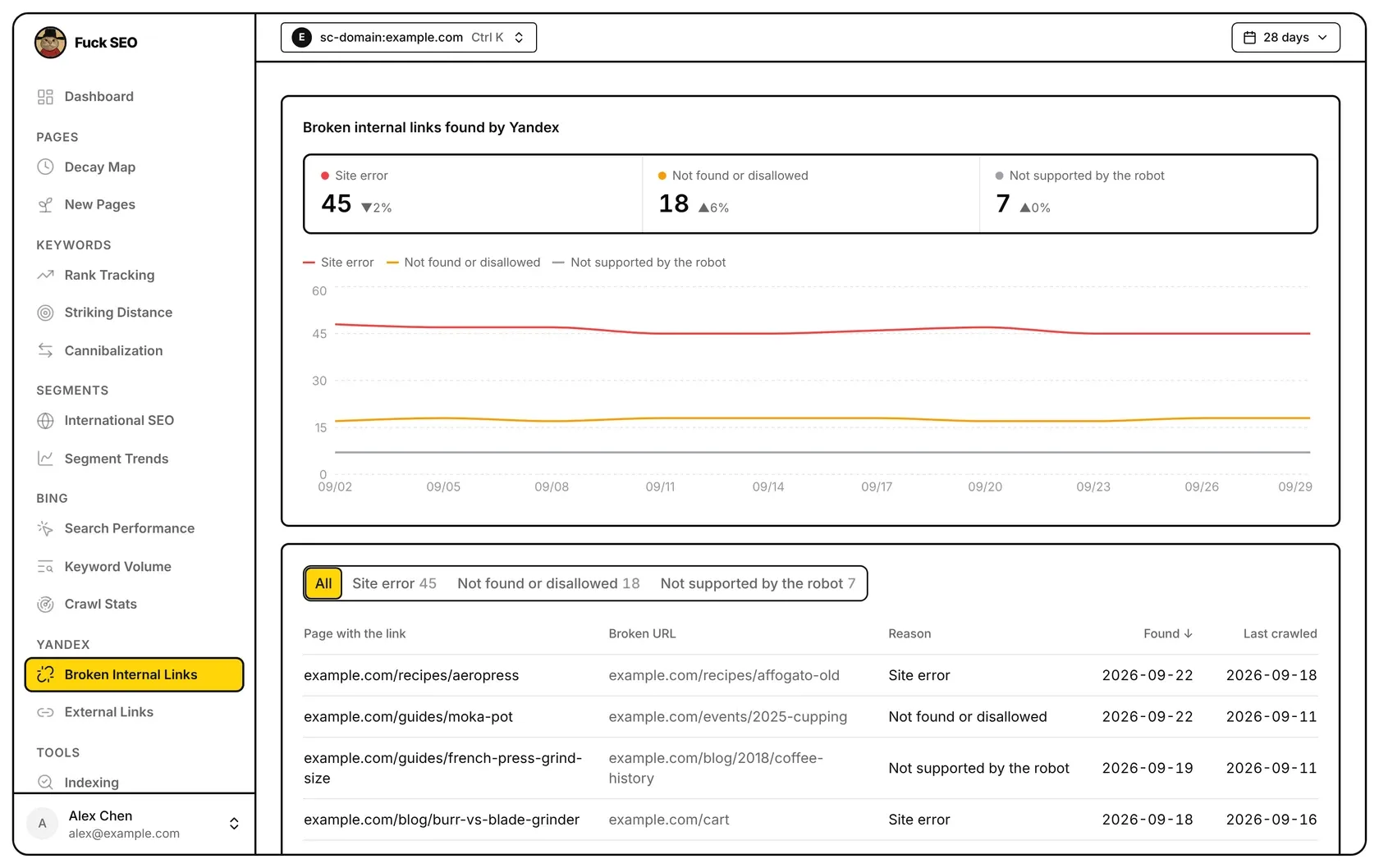
Broken Internal Links, in the Yandex section of the sidebar, shows the broken internal links Yandex has found on the site: how many there are for each reason, how those numbers changed over the selected dates, and the links themselves. The data comes from your Yandex Webmaster account, not from Search Console.
Where the data comes from
- When you open the page, Fuck SEO reads two things from the Yandex Webmaster API: Yandex’s history of broken-link numbers for the site over the last 480 days, and the list of broken links Yandex shows now for each reason.
- Fuck SEO only reads data from Yandex Webmaster; it doesn’t change anything there.
- Yandex’s data isn’t stored in our database. What was read is kept on our server until the end of the day (China Standard Time) for your account, this property and the Yandex site shown, so changing the dates or opening the page again that day doesn’t ask Yandex again.
- There is no Share or Export CSV button on this page, and interactive share links don’t include the Yandex pages.
When a request to Yandex Webmaster fails, the page shows Couldn’t load with the message “Yandex’s servers can’t be reached right now and may stay down for a long time. Yandex data won’t load until they’re back.” and a Retry button.
Connect Yandex
Until you connect, the page shows Connect Yandex Webmaster. Click Connect Yandex and allow access on Yandex’s page; you then come back to the page you started from. The connection belongs to the Google account you’re signed in with and covers both Yandex pages for all your sites.
You can also connect from the Yandex Webmaster card in Settings (in the account menu at the bottom of the sidebar). Once connected, the card shows when you connected and how many sites are in your Yandex account. Disconnect deletes the Yandex authorization Fuck SEO saved, and the Yandex pages show the connect panel again. It doesn’t remove Fuck SEO from the apps that have access to your Yandex account; that is done in your Yandex account. If the card can’t read your connection status, it shows the same “Yandex’s servers can’t be reached…” message.
The authorization is saved encrypted on our server. If Yandex no longer accepts it, for example because access was removed on Yandex’s side, the page shows the connect panel again the next time it asks Yandex for data.
Which Yandex site is used
Yandex Webmaster has its own list of sites. The page matches this Search Console property against the sites in it that are verified; sites not verified in Yandex Webmaster are left out.
- URL-prefix property: the Yandex site with the same address, ignoring letter case and a trailing slash.
- Domain property: every Yandex site on the domain or one of its subdomains. The one on the domain itself comes first, then the
www.one, with https before http.
If nothing matches, the page says This site isn’t in your Yandex account and that it has data once the site is added and verified in Yandex Webmaster.
When several Yandex sites match, a Yandex site row above the boxes lists them, and the first one is used. Click another one to switch. Your choice is remembered in this browser for this property, and External Links uses the same choice.
Dates
The top bar has only the date button: there are no Presets or Filter, and the date menu has no Search Type.
- Yandex doesn’t update these numbers every day. Preset ranges end on the latest day in Yandex’s history for the site; the date menu shows the dates in use.
- Custom dates can be picked from the first to the latest day in Yandex’s history, within the 480 days up to the latest day.
- Comparison Period offers Previous Period (the default), Year Over Year (for ranges up to 116 days), Custom and Disabled, as on the Dashboard. There’s no comparison when the comparison period would start before the first day in Yandex’s history, or outside the 480 days up to the end of the range; with Previous Period that means ranges longer than 240 days aren’t compared.
The history is read for the last 480 days at once, so changing the dates only changes which part of it is shown. The list of broken links and the numbers on its buttons don’t change with the dates.
Stat boxes
Under Broken internal links found by Yandex there is one box for each of the three reasons Yandex gives for a broken link. Each reason has its own colour, also used in the chart:
- Site error (red)
- Not found or disallowed (amber)
- Not supported by the robot (grey)
Each box shows the last number Yandex reported within the selected dates; days aren’t added up. Next to it, ▲ or ▼ shows the percentage change from the last number Yandex reported within the comparison period; hover it to see the comparison dates and that number. The change isn’t shown when there’s no comparison, or when the comparison period has no number or a 0. A box shows ”—” when Yandex reported nothing in the selected dates.
Chart
The chart has one line per reason, with a point for each day in the selected dates on which Yandex reported numbers; days without numbers are left off the horizontal axis. Hover the chart to see the date and each reason’s number.
When Yandex reported nothing in the selected dates, the chart is replaced by “Yandex has no broken-link data for this site in these dates”.
The list of broken links
The panel below lists the broken links Yandex shows now. The buttons above the table filter it: All, plus one button per reason with the number Yandex gives for that reason.
Fuck SEO fetches at most 1,000 links per reason: the first 1,000 Yandex returns. When a reason in the current filter has more, a note next to the buttons says so, for example “Showing the first 1,000 of Site error”.
The table has five columns:
- Page with the link: the page on which Yandex found the link.
- Broken URL: the address the link points to.
- Reason: one of the three reasons above.
- Found: the date Yandex found the link.
- Last crawled: the date Yandex last crawled the page with the link.
For a URL-prefix property, addresses are shown as paths; for a Domain property the host name is included, because the property can cover several subdomains. A missing date shows ”—”.
Rows are sorted by Found, newest first, with links that have no found date last; the order can’t be changed. Rows load 50 at a time as you scroll. When Yandex lists no broken links, the panel says “Yandex lists no broken internal links right now”.
On phones
The boxes are stacked one per row, and the filter buttons wrap onto more lines. In the table each link takes two rows: the first has the page with the link, with ”→” and the broken URL under it; the second has the reason and the found date. Last crawled isn’t shown on phones.
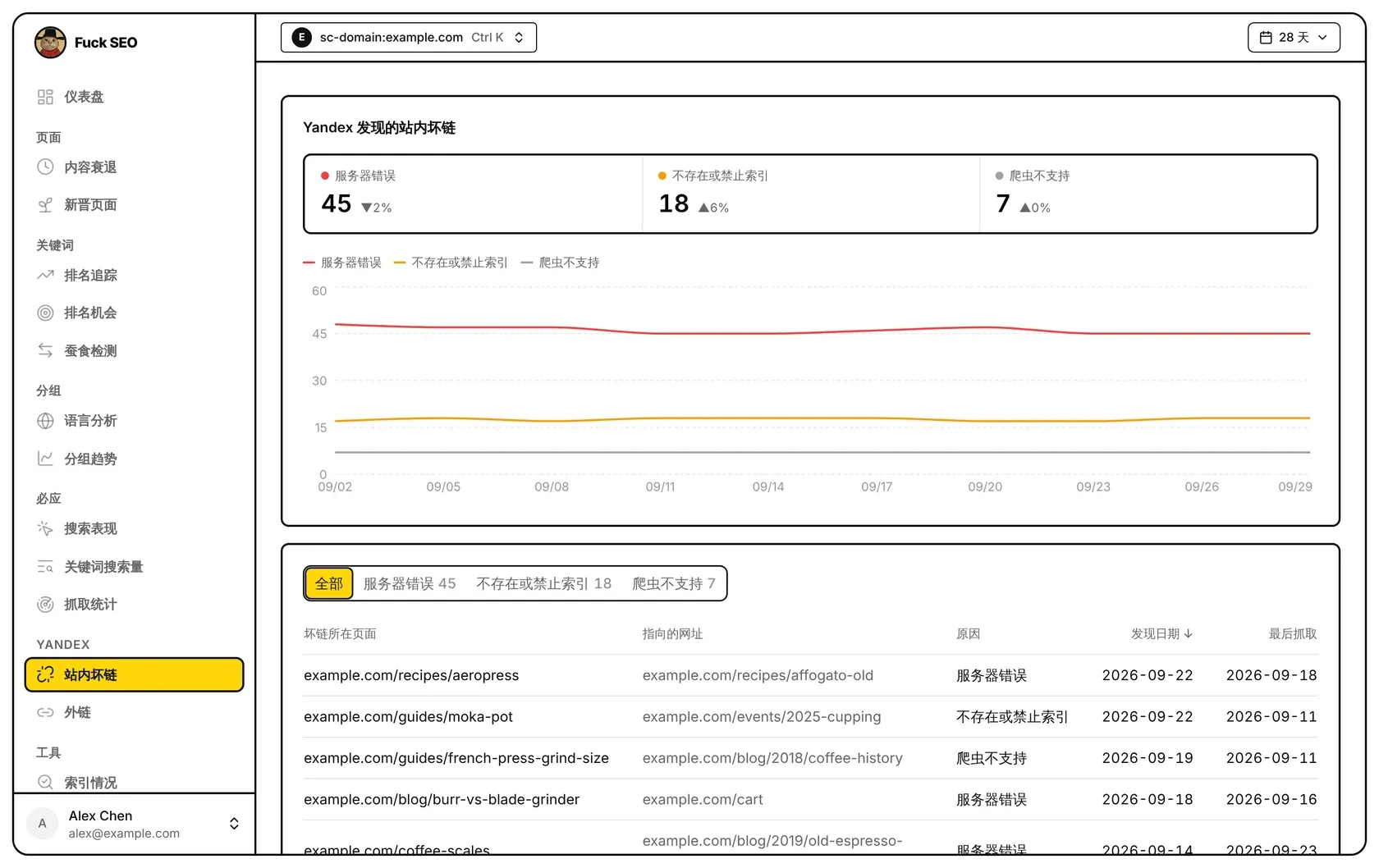
站内坏链在侧边栏的 Yandex 分组里,显示 Yandex 在这个站发现的站内坏链:每种原因各有多少、这些数量在所选日期内的变化,以及具体是哪些链接。数据来自你的 Yandex Webmaster 账号,不是 Search Console。
数据来源
- 打开页面时,Fuck SEO 从 Yandex Webmaster 接口读取两样东西:Yandex 对这个站最近 480 天的坏链数量记录,以及 Yandex 现在列出的每种原因的坏链明细。
- Fuck SEO 只读取 Yandex Webmaster 的数据,不会修改那里的任何东西。
- 我们的数据库不保存 Yandex 的数据。读到的结果按你的账号、这个资源和当前的 Yandex 站点,在我们的服务器上保留到当天结束(北京时间),所以当天换日期或再次打开页面,都不会再向 Yandex 读取。
- 这个页面没有 分享 和 导出 CSV 按钮,互动分享链接里也没有 Yandex 的页面。
向 Yandex Webmaster 读取失败时,页面显示 加载失败、提示「Yandex 的服务器目前连不上,可能要很长时间才能恢复,恢复之前读不到 Yandex 的数据。」和 重试 按钮。
连接 Yandex
还没连接时,页面显示 连接 Yandex Webmaster。点 连接 Yandex,在 Yandex 的页面上允许访问,之后会回到你出发的那个页面。连接属于你当前登录的 Google 账号,连接一次,所有站点的两个 Yandex 页面都能用。
也可以在 系统设置(侧边栏底部的账号菜单里)的 Yandex Webmaster 卡片里连接。连接后,卡片显示连接日期和你 Yandex 账号里有几个站点。点 断开 会删除 Fuck SEO 保存的 Yandex 授权,Yandex 的页面重新显示连接提示。断开不会把 Fuck SEO 从你 Yandex 账号的已授权应用里删掉,那要在你的 Yandex 账号里操作。卡片读不到连接状态时,也显示「Yandex 的服务器目前连不上……」这条提示。
Yandex 授权加密保存在我们的服务器上。Yandex 不再接受这个授权时(例如在 Yandex 那边取消了访问),页面下一次向 Yandex 读取数据时会重新显示连接提示。
用哪个 Yandex 站点
Yandex Webmaster 有自己的站点列表,页面用这个 Search Console 资源去对应其中 已验证 的站点;在 Yandex Webmaster 里没有验证的站点不算。
- 网址前缀资源:地址相同的 Yandex 站点,不区分大小写,也不管结尾的斜杠。
- 网域资源:这个域名及其子域名下的所有 Yandex 站点。域名本身的排在最前,其次是
www.的,同一个主机名 https 排在 http 前面。
一个都对应不上时,页面显示 你的 Yandex 账号里没有这个站,并说明站点加到 Yandex Webmaster 并验证之后才有数据。
对应上好几个 Yandex 站点时,格子上方有一行 Yandex 站点 列出它们,默认用第一个,点另一个即可切换。你的选择按 Search Console 资源记在这个浏览器里,外链 页面也用同一个选择。
日期
顶部只有日期按钮:没有 预设 和 筛选,日期菜单里也没有 搜索类型。
- Yandex 不是每天都更新这些数字。预设的日期范围截止到 Yandex 记录里这个站的最新一天,日期菜单里会显示实际用的日期。
- 自定义 日期可以选 Yandex 记录里的第一天到最新一天,且在最新一天往前 480 天以内。
- 对比周期 和 仪表盘 一样,可选 上一周期(默认)、同比(日期范围不超过 116 天时可选)、自定义 和 关闭。对比的那一段早于 Yandex 记录的第一天,或不在结束日期往前 480 天以内时,不做对比;选 上一周期 时,也就是超过 240 天的范围不对比。
最近 480 天的记录一次读齐,换日期只是换一段显示。坏链明细和按钮上的数量不随日期变化。
统计格子
Yandex 发现的站内坏链 下面,Yandex 给出的三种坏链原因各一个格子。每种原因有自己的颜色,趋势图里也用同样的颜色:
- 服务器错误(红色)
- 不存在或禁止索引(橙色)
- 爬虫不支持(灰色)
每个格子显示所选日期内 Yandex 最后一次给出的数字,不把各天加起来。旁边的 ▲ 或 ▼ 是和对比周期内 Yandex 最后一次给出的数字相比的变化百分比,鼠标移上去可以看到对比的日期和那个数字。没有对比,或对比周期里没有数字、数字为 0 时,不显示变化。所选日期内 Yandex 没有给出数字时,格子显示 ”—“。
趋势图
每种原因一条线,所选日期内 Yandex 给出数字的每一天各一个点;没有数字的日子不出现在横轴上。鼠标移到图上可以看到日期和每种原因的数字。
所选日期内 Yandex 没有给出任何数字时,图的位置显示「所选日期内 Yandex 没有这个站的坏链数据」。
坏链明细
下面的面板列出 Yandex 现在列出的坏链。表格上方的按钮用来筛选:全部,以及每种原因各一个按钮,按钮上是 Yandex 给出的这种原因的数量。
每种原因最多取 1,000 条,即 Yandex 返回的前 1,000 条。当前筛选里有原因超过 1,000 条时,按钮旁边会注明,例如「服务器错误只显示了前 1,000 条」。
表格有五列:
- 坏链所在页面:Yandex 在哪个页面上发现了这条链接。
- 指向的网址:链接指向的地址。
- 原因:上面三种原因之一。
- 发现日期:Yandex 发现这条链接的日期。
- 最后抓取:Yandex 最近一次抓取坏链所在页面的日期。
网址前缀资源只显示路径;网域资源可能包含多个子域名,所以带域名显示。没有日期时显示 ”—”。
表格按 发现日期 从新到旧排列,没有发现日期的排在最后,不能改变排序。往下滚动时每次多加载 50 行。Yandex 没有列出任何坏链时,这里显示「Yandex 现在没有列出站内坏链」。
手机上
格子每行一个,筛选按钮放不下时换行。表格里每条链接分两行显示:第一行是坏链所在页面,下面跟着「→ 指向的网址」;第二行是原因和发现日期。最后抓取 不在手机上显示。