Help Center帮助中心 Bing必应
Bing Keyword Volume必应关键词搜索量
Last updated更新于 2026-10-17
Keyword Volume, in the Bing section of the sidebar, shows Bing’s numbers for any keyword you type: its weekly impressions in the country you choose, its impressions in each of 11 countries, and related keywords. The data comes from the keyword research in your Bing Webmaster Tools account. Before you look anything up, the page lists the site’s top Bing queries as suggestions.
Where the data comes from
- Fuck SEO reads the numbers from the Bing Webmaster Tools API when you look up a keyword, so the keywords you look up are sent to Bing. Access is read-only.
- Bing returns one country per request, so a lookup reads all 11 countries at once.
- Bing’s data isn’t stored in our database. A keyword’s weekly numbers are kept on our server until the end of the day (China Standard Time), so looking the same keyword up again that day, or changing the dates, uses them again instead of asking Bing. Related keywords are kept the same way, separately for each date range.
- There is no Share button on this page, and interactive share links don’t include the Bing pages.
If the Bing API returns an error, the page shows it, with Bing’s own message, and a Retry button.
Connect Bing
The page uses the same Bing Webmaster Tools connection as the other Bing pages. Until you connect, it shows Connect Bing Webmaster Tools; click Connect Bing and allow access on Bing’s page. You can also connect or disconnect on the Bing Webmaster Tools card in Settings (in the account menu at the bottom of the sidebar). See Search Performance for details.
Looking up a keyword doesn’t use the site you have open, so it works even when the site isn’t in your Bing account. Only the suggestions need the site to be there.
Look up a keyword
Type any keyword (up to 200 characters) in the box and click Look up or press Enter. Clicking a suggested or related keyword looks it up too. Clearing the box goes back to the suggestions.
Bing’s keyword data is per country. The page covers 11, each in one language:
| Country | Language |
|---|---|
| United States | English |
| United Kingdom | English |
| India | English |
| Canada | English |
| Australia | English |
| Germany | German |
| France | French |
| Spain | Spanish |
| Italy | Italian |
| Japan | Japanese |
| Brazil | Portuguese |
The default is United States. To switch, click a country under By country; the country you pick is remembered in this browser.
Weeks and dates
Bing reports a keyword week by week: each week has one date and two numbers, exact-match impressions and broad-match impressions. A week counts toward the selected dates when its date falls inside them.
The top bar has only the date menu, with the same date ranges and Comparison Period options as the Dashboard. After a lookup, the dates follow the keyword’s weeks:
- Preset ranges end on the latest week Bing has for the keyword in any of the 11 countries.
- Custom dates can only be picked between the earliest and the latest week Bing has for the keyword, at most 480 days back.
- The comparison applies only to the two totals. Nothing is compared when the comparison would start more than 6 days before the earliest week Bing has for the keyword, or more than 480 days before the end date.
Before a lookup, the dates follow the site’s Bing data, as on Search Performance, and nothing is compared.
The keyword
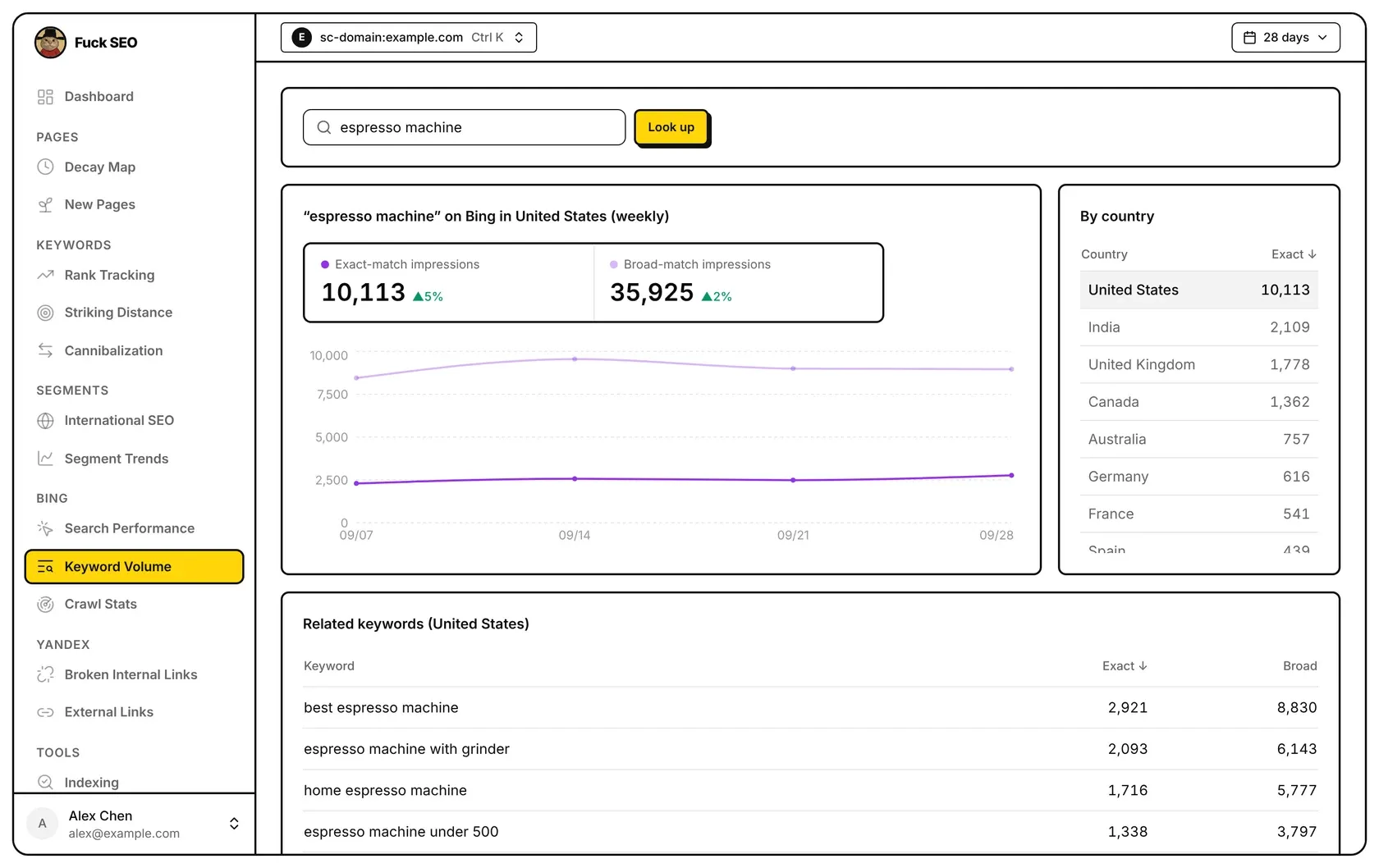
The first panel is titled with the keyword and the country, such as “espresso machine” on Bing in United States (weekly), and has:
- Exact-match impressions and Broad-match impressions: the sum of the weeks in the selected dates, each with its percentage change against the comparison period. Hover the change to see the earlier sum; ”—” means it was 0.
- A weekly chart for the weeks in the selected dates: the darker line is exact match, the lighter line broad match. Hover a week to see both numbers. There’s no line for the comparison period. When the selected country has no weeks in these dates, a message takes the chart’s place.
When Bing has no weeks for the keyword in any of the 11 countries, the page shows only a “Bing has no data for …” message.
By country
By country lists each country’s exact-match impressions in the selected dates, highest first. The selected country is highlighted; click another one to show its totals, chart and related keywords. On wide screens the list sits beside the chart and scrolls inside its box; on narrower screens it’s below the chart.
Related keywords
Related keywords lists the keywords Bing relates to this one, for the selected country and dates, with their Exact and Broad impressions as Bing reports them. They’re sorted by exact-match impressions, highest first. Click one to look it up. When Bing returns none, the panel says “Bing lists no related keywords”.
Suggested keywords
Before you look up a keyword, Suggested keywords lists the site’s 10 Bing queries with the most impressions in the selected dates, from the same data as Search Performance. The numbers beside them aren’t the site’s: they’re each keyword’s exact-match Bing impressions in the selected country.
- Trend (weekly): the keyword’s exact-match impressions for each week in the selected dates; ”—” when there are fewer than two weeks.
- Impressions: the sum of those weeks. The list is sorted by it, highest first.
Click a keyword to look it up. The suggestions need the site in your Bing account; otherwise the page says This site isn’t in your Bing account. When several Bing sites match this property, a Bing site row lets you choose one, as on Search Performance. When the site has no Bing queries in the selected dates, the panel says “Bing has no queries for this site in these dates”.
On phones
In the related keywords and the suggestions, each keyword takes its own line, with the numbers on the line below. By country is below the chart.
关键词搜索量在侧边栏的 必应 分组里,显示你输入的任意关键词在必应的数据:所选国家每周的展示、在 11 个国家各自的展示,以及相关关键词。数据来自你必应 Webmaster Tools 账号里的关键词研究。还没查词时,页面把这个站在必应展示最多的查询词列为推荐关键词。
数据来源
- 查一个关键词时,Fuck SEO 从必应 Webmaster Tools 接口读取数据,所以你查的关键词会发送给必应。权限是只读的。
- 必应一次只能查一个国家,所以每查一个词,会同时读取全部 11 个国家。
- 我们的数据库不保存必应的数据。一个关键词每周的数据在我们的服务器上保留到当天结束(北京时间),当天再查同一个词或换日期,都直接用这份数据,不再向必应读取。相关关键词也这样保留,每个日期范围各一份。
- 这个页面没有 分享 按钮,互动分享链接里也没有必应的页面。
必应接口出错时,页面显示错误信息(带上必应的原话)和 重试 按钮。
连接必应
这个页面和其他必应页面用同一个必应 Webmaster Tools 连接。还没连接时,页面显示 连接必应 Webmaster Tools;点 连接必应,在必应的页面上允许访问即可。也可以在 系统设置(侧边栏底部的账号菜单里)的 Bing Webmaster Tools 卡片里连接或断开。详见 搜索表现。
查关键词不用到当前打开的站点,所以即使这个站不在你的必应账号里也能查。只有推荐关键词需要站点在必应账号里。
查一个关键词
在输入框里输入任意关键词(最多 200 个字符),点 查询 或按回车。点推荐关键词或相关关键词也会查这个词。清空输入框会回到推荐关键词。
必应的关键词数据按国家区分。页面支持 11 个国家,每个国家用一种语言:
| 国家 | 语言 |
|---|---|
| 美国 | 英语 |
| 英国 | 英语 |
| 印度 | 英语 |
| 加拿大 | 英语 |
| 澳大利亚 | 英语 |
| 德国 | 德语 |
| 法国 | 法语 |
| 西班牙 | 西班牙语 |
| 意大利 | 意大利语 |
| 日本 | 日语 |
| 巴西 | 葡萄牙语 |
默认是美国。在 国家分布 里点另一个国家即可切换,选过的国家会记在这个浏览器里。
每周数据和日期
必应按周给出关键词的数据:每周一个日期、两个数字,即精确匹配展示和广泛匹配展示。某一周的日期落在所选日期内,这一周就计入。
顶栏只有日期菜单,日期范围和 对比周期 选项与 仪表盘 相同。查词以后,日期按这个关键词的周走:
- 预设的日期范围截止到必应在 11 个国家里有这个词数据的最晚一周。
- 自定义 日期只能在必应有这个词数据的最早一周和最晚一周之间选,最早到 480 天前。
- 对比只作用于两个汇总数字。对比段的起点比必应有这个词数据的最早一周还早 6 天以上,或早于结束日期往前 480 天时,就不做对比。
还没查词时,日期按这个站的必应数据走,和搜索表现一样,也不做对比。
关键词数据
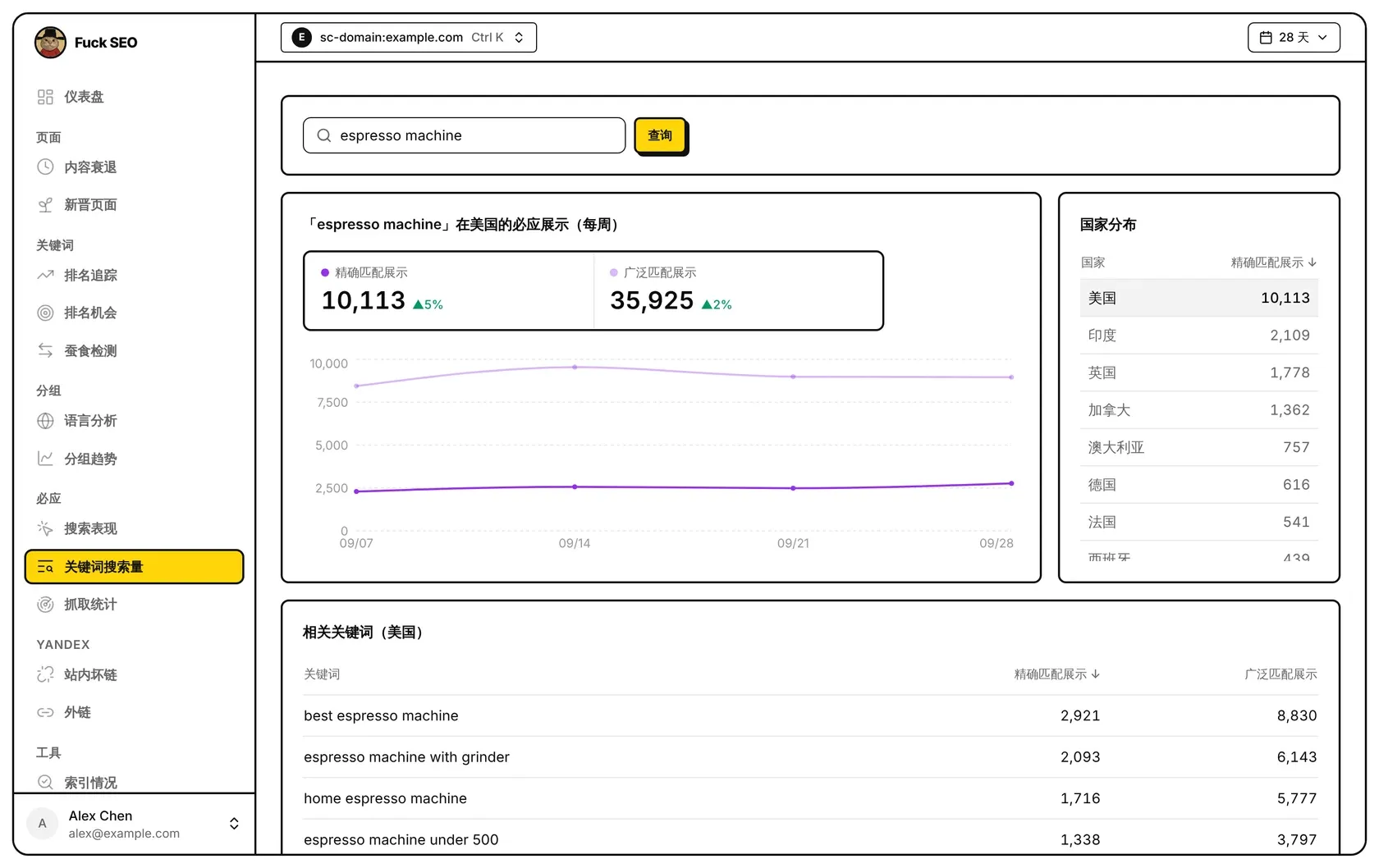
第一块面板的标题写着关键词和国家,例如 「espresso machine」在美国的必应展示(每周),里面有:
- 精确匹配展示 和 广泛匹配展示:所选日期内各周相加,旁边是与对比周期相比的百分比变化。鼠标移到变化上可以看到对比周期的合计;对比周期为 0 时显示 ”—”。
- 每周趋势图,只画所选日期内的周:颜色深的是精确匹配,浅的是广泛匹配。鼠标移到某一周可以看到两个数字。图上不画对比周期的线。所选国家在这段日期内没有数据时,图的位置显示一行说明。
必应在 11 个国家里都没有这个词的数据时,页面只显示一行「必应没有……的数据」。
国家分布
国家分布 列出每个国家在所选日期内的精确匹配展示,从高到低排列。当前选中的国家有底色;点另一个国家,上面的汇总、趋势图和下面的相关关键词都会换成那个国家的。宽屏上这块在趋势图右边,放不下时在框里滚动;窄屏上在趋势图下面。
相关关键词
相关关键词 列出必应给出的与这个词相关的关键词,国家和日期都按当前所选,显示必应给出的 精确匹配展示 和 广泛匹配展示,按精确匹配展示从高到低排列。点一个即可查这个词。必应没有给出时,这里显示「必应没有给出相关关键词」。
推荐关键词
还没查词时,推荐关键词 列出这个站在必应所选日期内展示最多的 10 个查询词,数据和 搜索表现 相同。旁边的数字不是这个站的数据,而是每个词在所选国家的必应精确匹配展示:
- 趋势(每周):这个词在所选日期内每周的精确匹配展示;不到两周时显示 ”—”。
- 展示:这几周的合计,列表按它从高到低排列。
点一个词即可查询。推荐关键词需要这个站在你的必应账号里,否则页面显示 你的必应账号里没有这个站。这个资源对应上好几个必应站点时,可以用 必应站点 那一行选择,和搜索表现一样。所选日期内这个站在必应没有查询词时,这里显示「所选日期内必应没有这个站的查询词」。
手机上
相关关键词和推荐关键词里,每个关键词单独占一行,数字在下一行。国家分布 在趋势图下面。