Help Center帮助中心 Getting started入门
Getting started快速上手
Last updated更新于 2026-10-17
Fuck SEO reads your Google Search Console data live and lays it out in pages built for specific questions: which pages are losing clicks, where the keywords you care about rank, which queries several of your pages compete for, and more. There is nothing to install. Only your Google account is required; you can also connect Bing and Yandex in Settings to see their data.
Sign in
- On fuckseo.io, click Login and choose your Google account.
- Google asks to let Fuck SEO view your Search Console data and see your name and email address. Keep the Search Console permission ticked: without it, sign-in stops on a page that asks you to sign in again.
The Search Console permission is read-only. Fuck SEO can’t change anything in your Search Console account.
You stay signed in for 30 days, renewed each time you use Fuck SEO. While you’re signed in, opening fuckseo.io takes you straight to the app.
Your sites
After you sign in, the home page lists every Search Console property your Google account can access, in the order Google returns them. Each card covers the last 13 weeks:
- total clicks and impressions, each with the change against the 13 weeks before it (”—” when the earlier period had none);
- a blue line for daily clicks and a purple line for daily impressions, each on its own scale;
- lighter dashed lines for the previous 13 weeks, shifted by 91 days so the same weekdays line up;
- hover the chart to see the date, clicks and impressions for both periods.
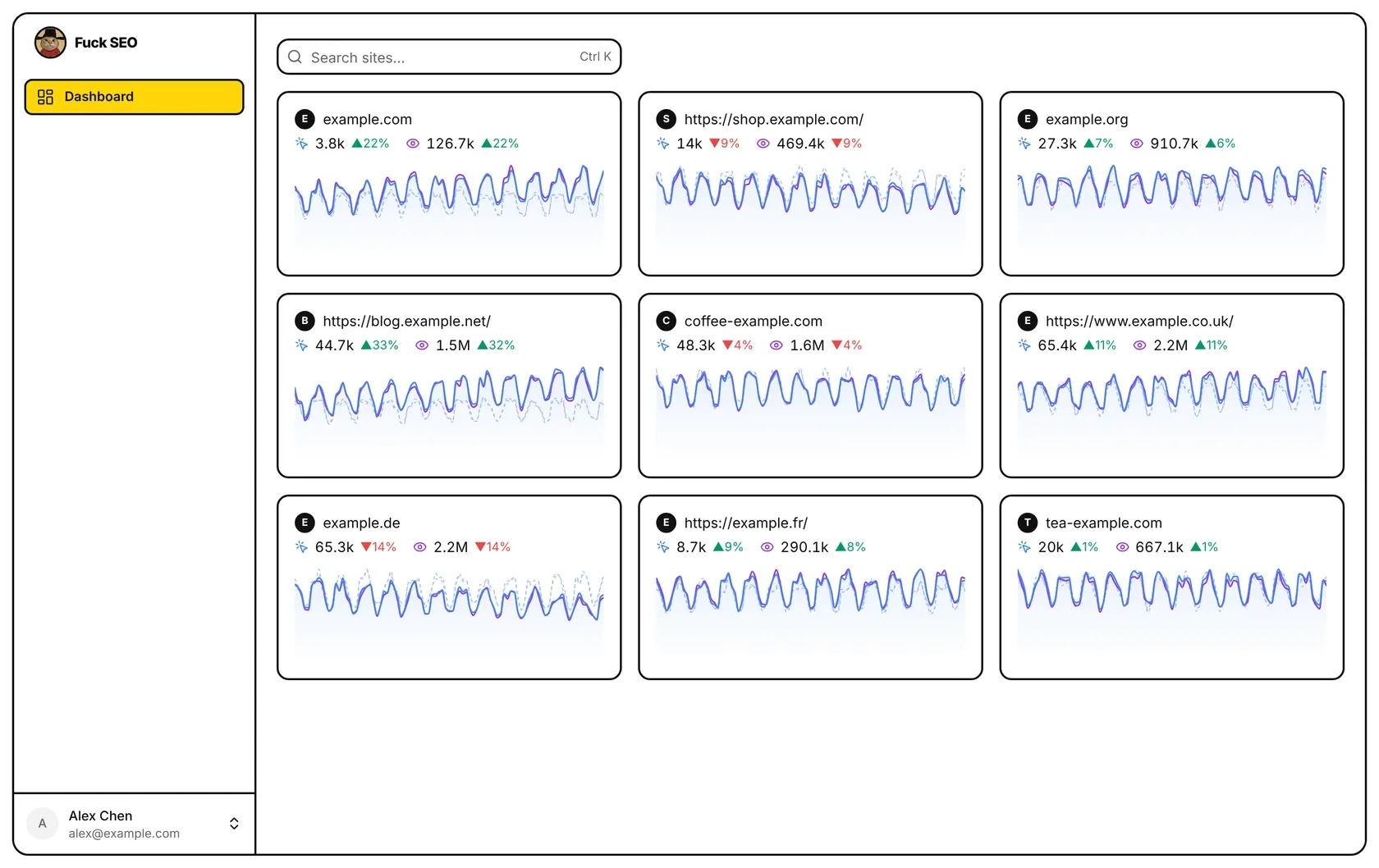
A card loads its numbers when you scroll it into view. To find a site, type part of its address in the search box (⌘K on a Mac, Ctrl K elsewhere); press Enter to open it when only one site matches.
If the page says No Search Console sites yet, add and verify your website in Google Search Console first, then refresh.
Open a site
Click a card to open that site. The sidebar lists its pages:
| Group | Pages |
|---|---|
| Dashboard | Dashboard |
| Pages | Decay Map, New Pages |
| Keywords | Rank Tracking, Striking Distance, Cannibalization |
| Segments | International SEO, Segment Trends |
| Bing | Search Performance, Keyword Volume, Crawl Stats |
| Yandex | Broken Internal Links, External Links |
| Tools | Indexing, Export Data, Change Notes |
A page asks Google (or Bing, or Yandex) for its data only when you open it. The Bing and Yandex pages need your Bing or Yandex account connected in Settings first.
Account menu
Click your name at the bottom of the sidebar to open the account menu. Its top part has Settings, Changelog, Help Center and Contact (the home page’s menu has no Settings). Changelog lists recent updates, and while there are new features you haven’t seen, their count shows next to your name; Help Center opens these articles in a new tab.
The bottom part is for your Google accounts: Add account signs in another Google account; after that, the menu lists your other accounts so you can switch between them, and Sign out of all accounts signs out of every one.
Settings
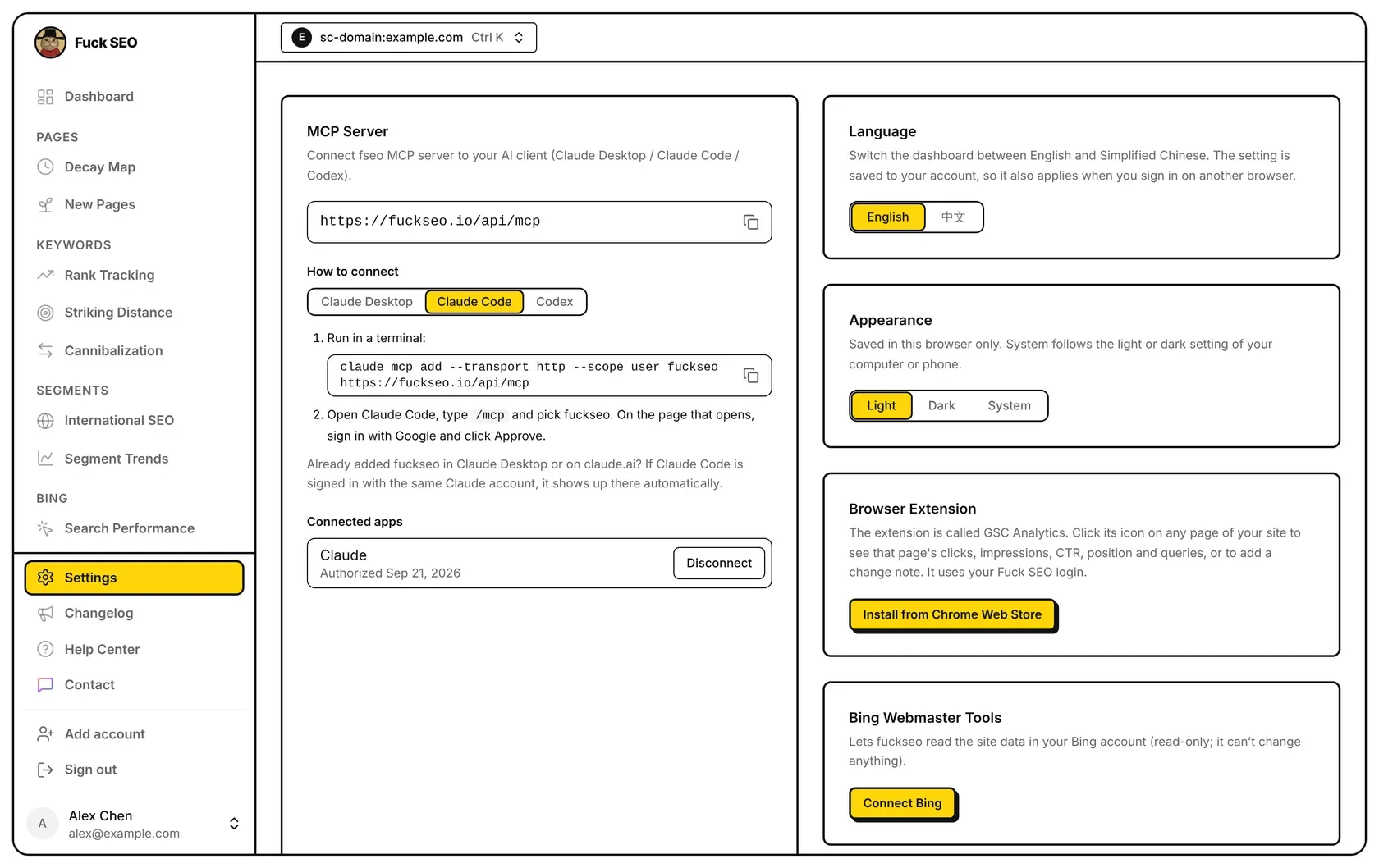
Settings in the account menu has:
- Language: English or 中文. It’s saved to your account, so it also applies when you sign in on another browser.
- Appearance: Light, Dark or System, saved in the current browser only.
- MCP Server: connect Claude or Codex to your data; see MCP server.
- Shared links: every share link of yours that hasn’t expired, for all sites; see Sharing.
- Browser Extension: a link to install the extension from the Chrome Web Store; see Browser extension. Not shown on phones.
- Bing Webmaster Tools and Yandex Webmaster: connect your Bing or Yandex account (read-only) for the Bing and Yandex pages, or disconnect it.
- Feedback & Community: how to reach us.
Your data
Search Console data is read from Google every time you open a page and is not kept in our database; responses may be cached briefly on our servers and in your browser so pages load faster. What we do store is listed in the Privacy Policy: your Google authorization and, if you connect them, your Bing and Yandex authorizations (encrypted), the keywords you add to Rank Tracking, your notes, the share links you create and your settings. For how the date range and totals are worked out, see Data and limits.
Fuck SEO 实时读取你的 Google Search Console 数据,按具体问题整理成一个个页面:哪些页面的点击在减少、你关心的关键词排第几、哪些查询词有好几个页面在一起排名,等等。不用安装任何东西,只需要 Google 账号;想看必应和 Yandex 的数据,也可以在系统设置里连接它们。
登录
- 在 fuckseo.io 点 登录,选择你的 Google 账号。
- Google 会请你允许 Fuck SEO 查看你的 Search Console 数据,以及你的姓名和邮箱。Search Console 这一项要保持勾选:取消勾选的话,登录会停在一个请你重新登录的页面。
Search Console 权限是只读的,Fuck SEO 无法修改你 Search Console 里的任何东西。
登录状态保存 30 天,每次使用都会续期。登录期间打开 fuckseo.io 会直接进入应用。
你的站点
登录后,首页列出这个 Google 账号能访问的所有 Search Console 资源,顺序与 Google 返回的一致。每张卡片显示近 13 周的数据:
- 点击和展示的总数,以及与再往前 13 周相比的变化(上期为 0 时显示 ”—”);
- 蓝线是每日点击,紫线是每日展示,两条线各用各的纵轴;
- 同色浅一档的虚线是上一个 13 周,往前错开 91 天,让同一个星期几对齐;
- 鼠标移到曲线上,可以看到两个周期对应日期的点击数和展示数。
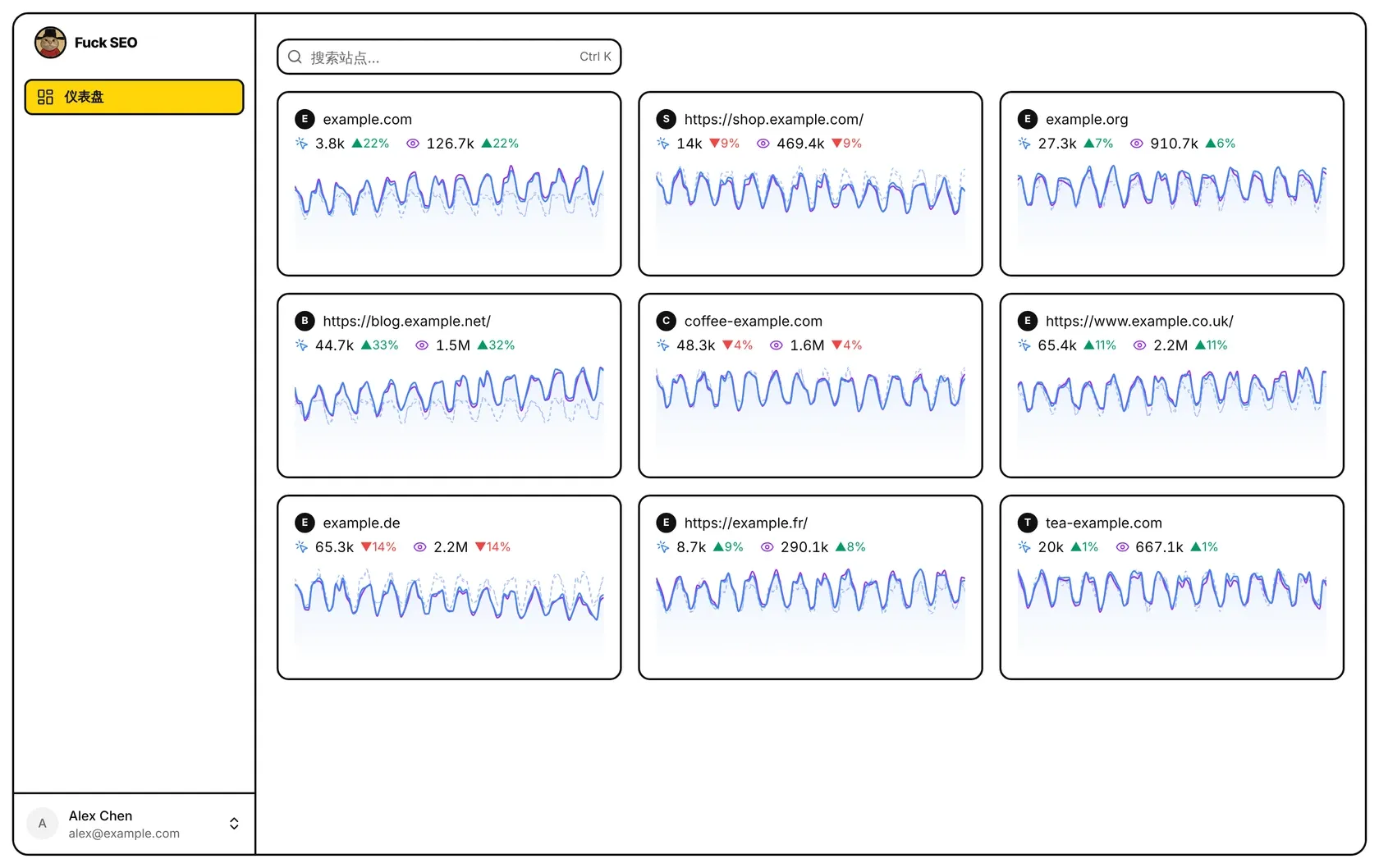
卡片滚动到可见位置时才加载数字。要找某个站点,在搜索框里输入网址的一部分(Mac 上按 ⌘K,其他电脑按 Ctrl K);只剩一个站点时按 回车 直接打开。
如果页面显示 还没有 Search Console 站点,请先在 Google Search Console 添加并验证你的网站,然后刷新。
打开站点
点一张卡片就打开那个站点,侧边栏列出它的各个页面:
| 分组 | 页面 |
|---|---|
| 仪表盘 | 仪表盘 |
| 页面 | 内容衰退、新晋页面 |
| 关键词 | 排名追踪、排名机会、蚕食检测 |
| 分组 | 语言分析、分组趋势 |
| 必应 | 搜索表现、关键词搜索量、抓取统计 |
| Yandex | 站内坏链、外链 |
| 工具 | 索引情况、导出数据、变更笔记 |
打开哪个页面,才向 Google(或必应、Yandex)读取那个页面的数据。必应和 Yandex 的页面要先在系统设置里连接对应的账号。
账号菜单
点侧边栏底部你的名字,打开账号菜单。菜单上面是 系统设置、更新日志、帮助中心 和 联系我们(首页的菜单里没有系统设置)。更新日志 列出最近的更新,有没看过的新功能时,你的名字旁边会显示条数;帮助中心 会在新标签页打开这些文章。
菜单下面管理 Google 账号:添加账号 可以再登录一个 Google 账号;之后菜单里会列出你的其他账号,点一下即可切换,退出全部账号 会退出所有账号。
系统设置
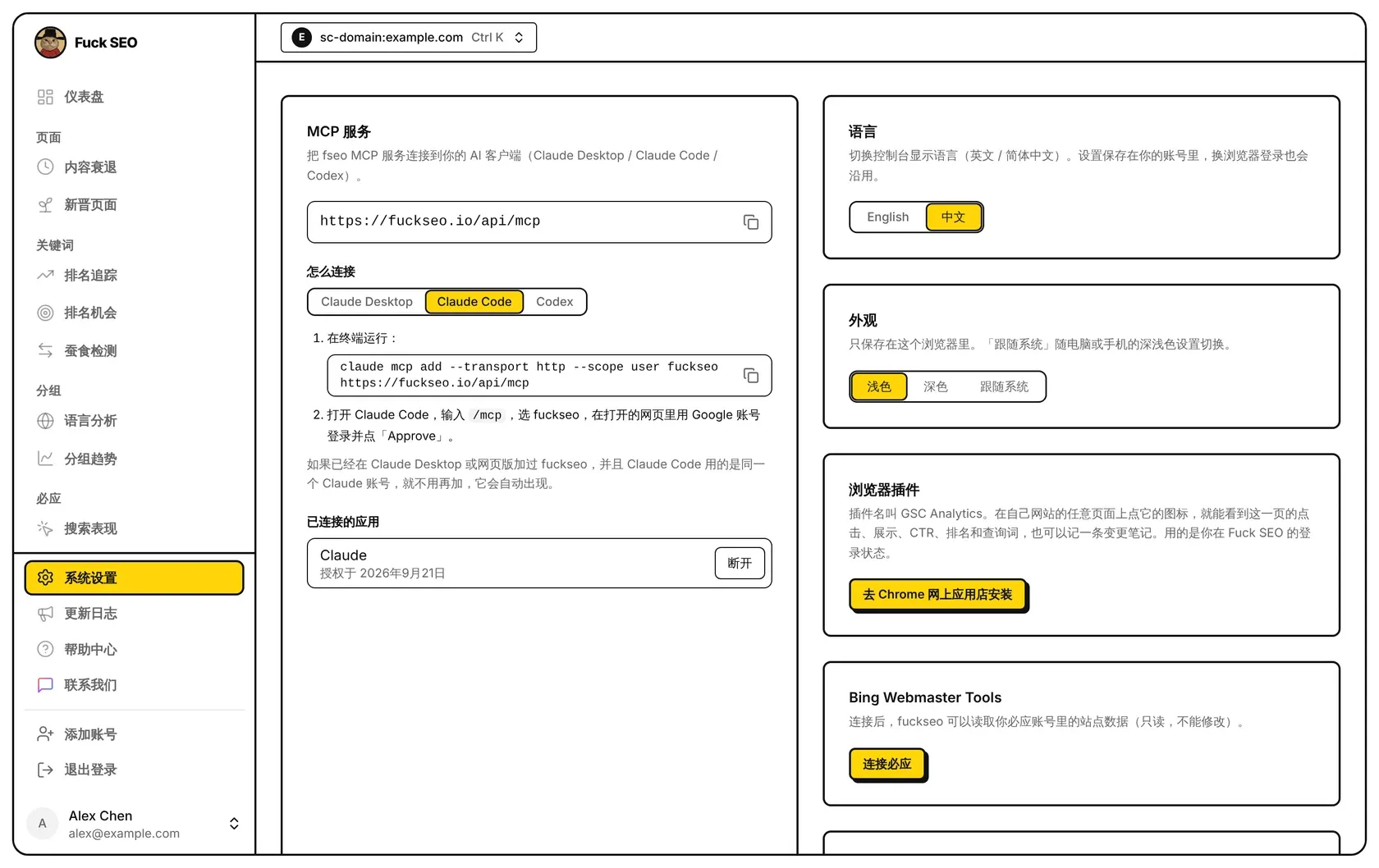
账号菜单里的 系统设置 有:
- 语言:English 或中文。保存在你的账号里,换个浏览器登录也一样。
- 外观:浅色、深色 或 跟随系统,只保存在当前浏览器里。
- MCP 服务:把 Claude 或 Codex 连到你的数据,见 MCP 服务。
- 已分享的链接:你在所有站点上还没过期的分享链接,见 分享。
- 浏览器插件:去 Chrome 网上应用店安装插件的入口,见 浏览器插件。手机上不显示。
- Bing Webmaster Tools 和 Yandex Webmaster:连接你的必应或 Yandex 账号(只读),用于必应和 Yandex 的页面;也可以在这里断开。
- 反馈与交流:联系我们的方式。
你的数据
每次打开页面都会向 Google 实时读取 Search Console 数据,我们的数据库不保存这些数据;为了加快加载,接口结果可能会在我们的服务器和你的浏览器里短暂缓存。我们保存了哪些东西,见 隐私政策:你的 Google 授权,以及你连接过的必应、Yandex 授权(加密保存)、你在排名追踪里添加的关键词、你的笔记、你生成的分享链接和你的设置。日期范围和汇总数字怎么算,见 数据说明。