Help Center帮助中心 Segments分组
International SEO语言分析
Last updated更新于 2026-10-09
International SEO splits your Search Console data by language version. It works out each page’s language from its URL, then shows a daily trend for every language, a table of totals per language and a table per country. There is nothing to set up: the page reads the URLs Google reports for the selected date range.
How languages are detected
Each page URL is checked in this order:
- Subdomain: the first part of the host name is a language code, for example
fr.example.comorpt-br.example.com. This applies to Domain properties (sc-domain:), which can include several subdomains; a URL-prefix property only contains its own host. - Subdirectory: the first folder of the path is a language code, for example
/fr/,/pt-br/,/zh_CN/or/es-419/. Upper or lower case and_or-don’t matter. - Every other URL counts as Primary language, shown with the hint “other URLs”.
A language code is one of these 47 two-letter codes: af, ar, bg, bn, ca, cs, da, de, el, en, es, et, fa, fi, fr, he, hi, hr, hu, id, it, ja, ko, lt, lv, ms, nb, nl, nn, no, pl, pt, ro, ru, sk, sl, sq, sr, sv, sw, th, tl, tr, uk, ur, vi, zh. It may be followed by a two-letter region (en-us), a four-letter script (zh-hans) or a three-digit region (es-419). Two-letter folders that aren’t on the list, such as /jp/, are not treated as languages. en is on the list, so pages under /en/ form their own English group rather than joining the primary language.
Each language is shown by name in the interface language (French, 法语), followed by the subdirectory or subdomain it was found in.
If no language versions are found, a note above the page says so and every page counts as the primary language. If the property itself is a language subdomain, such as sc-domain:fr.example.com, the page explains that it can’t be split by language and shows no data.
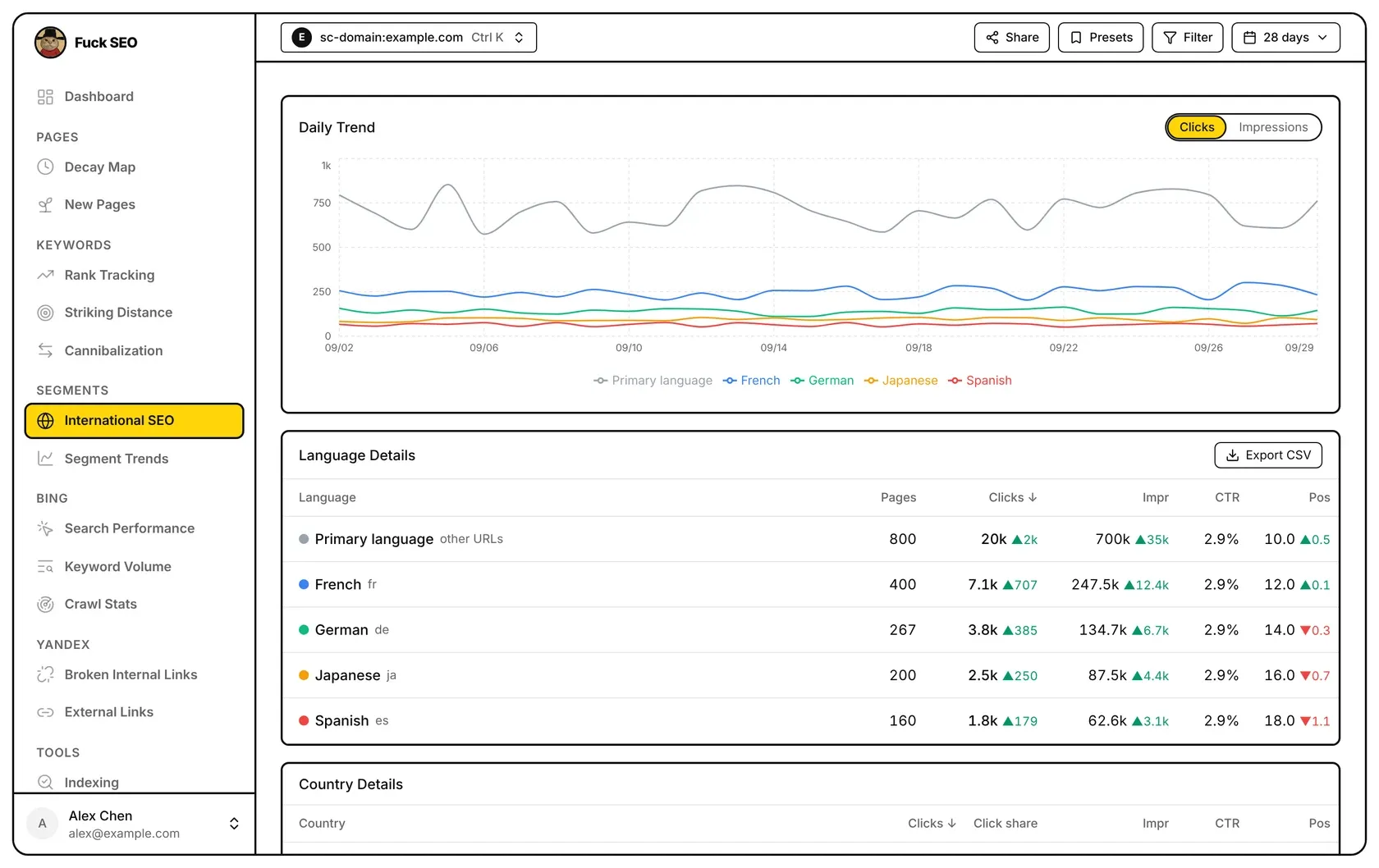
Daily Trend
The chart draws one line per language; the primary language is always grey. Use the Clicks / Impressions switch to choose the metric, and hover the chart to see each language’s number for that day.
Language Details
One row per language, sorted by clicks from highest to lowest. Click a column header to sort by it; click again to reverse.
- Pages: how many different pages in that language had clicks or impressions in the selected period.
- Clicks and Impr: totals for the period. The small green ▲ or red ▼ is the difference from the previous period as a number (not a percentage); hover the number to see the previous period’s value and dates.
- CTR: total clicks ÷ total impressions, or ”—” when the language had no impressions.
- Pos: average position weighted by impressions. A green ▲ means the position number went down (a higher ranking). The change is shown only when both periods have impressions.
Export CSV downloads this table. In the file, the clicks and impressions changes are percentages, the position change is a difference, and the URL Pattern column holds the subdirectory or subdomain. The button isn’t shown on phones.
Country Details
This table covers the whole property, all languages together. Columns: Country, Clicks, Click share (the country’s share of all clicks in the period), Impr, CTR and Pos, with the same change markers as above. It is sorted by clicks from highest to lowest; click Clicks, Impr, CTR or Pos to sort by that column. Only the first 20 rows are shown until you click Show all N countries. Countries Google doesn’t identify are listed as Unknown region.
Date range and comparison
- The page follows the date menu, up to 16 months (480 days). Without a custom range, the period ends on the latest day with final data.
- Changes always compare with the same number of days right before the selected period. The Comparison Period option in the date menu doesn’t change this page.
- For ranges longer than 240 days, the previous period isn’t loaded, so no changes are shown.
- The Search Type in the date menu applies. With Discover, which has no position data, the Pos columns are hidden.
- Filters from Filter or Presets in the toolbar don’t apply to this page.
Share in the toolbar opens the share window with this page already ticked as a report section; see Sharing. For how totals and dates are worked out in general, see Data and limits.
语言分析把你的 Search Console 数据按语言版本拆开。它从每个页面的网址判断语言,然后给出每种语言的每日趋势、按语言汇总的表格和按国家汇总的表格。不需要任何设置:页面直接读取 Google 在所选日期范围内报告的网址。
怎么识别语言
每个页面网址按下面的顺序判断:
- 子域名:主机名的第一段是语言代码,例如
fr.example.com、pt-br.example.com。这只适用于网域资源(sc-domain:),它可以包含多个子域名;网址前缀资源只有自己这一个主机名。 - 子目录:路径的第一层目录是语言代码,例如
/fr/、/pt-br/、/zh_CN/、/es-419/。不区分大小写,_和-都可以。 - 其余网址都算作 主语言,后面标注「其余 URL」。
语言代码是下面这 47 个两字母代码之一:af、ar、bg、bn、ca、cs、da、de、el、en、es、et、fa、fi、fr、he、hi、hr、hu、id、it、ja、ko、lt、lv、ms、nb、nl、nn、no、pl、pt、ro、ru、sk、sl、sq、sr、sv、sw、th、tl、tr、uk、ur、vi、zh。后面可以带两字母地区(en-us)、四字母文字(zh-hans)或三位数字地区(es-419)。不在名单里的两字母目录(例如 /jp/)不算语言。en 在名单里,所以 /en/ 下的页面会单独成为「英语」一组,不并入主语言。
每种语言按界面语言显示名称(法语、French),后面是识别出它的子目录或子域名。
如果没有识别出任何语言版本,页面上方会有提示,所有页面都算作主语言。如果资源本身就是一个语言子域名(例如 sc-domain:fr.example.com),页面会说明它无法按语言拆分,不显示数据。
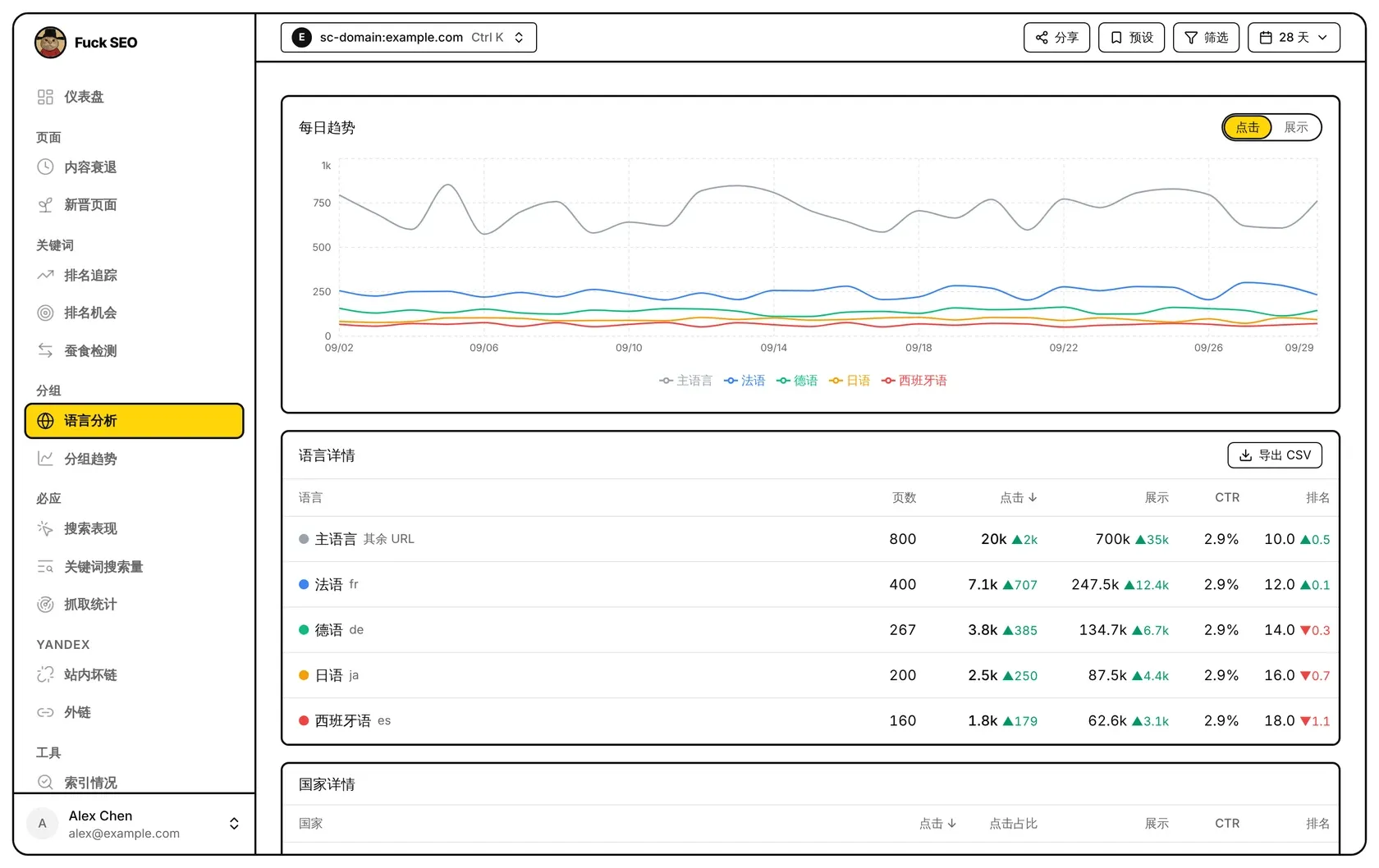
每日趋势
图上每种语言一条线,主语言固定为灰色。用 点击 / 展示 切换指标,鼠标移到图上可以看到当天每种语言的数字。
语言详情
每种语言一行,默认按点击从高到低排列。点列名按这一列排序,再点一次反过来。
- 页数:所选期间里这种语言有点击或展示的不同页面数。
- 点击 和 展示:期间内的总数。旁边绿色 ▲ 或红色 ▼ 是与上一周期的差值(是数量,不是百分比);鼠标移到数字上可以看到上一周期的数值和日期。
- CTR:总点击 ÷ 总展示;这种语言没有展示时显示 ”—”。
- 排名:按展示量加权的平均排名。绿色 ▲ 表示排名数字变小(排得更靠前)。两期都有展示时才显示变化。
导出 CSV 下载这张表。文件里点击和展示的变化是百分比,排名变化是差值,URL Pattern 一列是子目录或子域名。手机上不显示这个按钮。
国家详情
这张表统计整个资源,不分语言。列有 国家、点击、点击占比(这个国家占期间内全部点击的比例)、展示、CTR 和 排名,变化的标法同上。默认按点击从高到低排列,点 点击、展示、CTR 或 排名 可以按这一列排序。先只显示前 20 行,点 显示全部 N 个国家 显示其余的。Google 无法识别的国家显示为 未知地区。
日期范围和对比
- 页面跟随日期菜单,最长 16 个月(480 天)。没有选自定义日期时,期间截止到已有最终数据的最新一天。
- 变化一律与所选期间之前、天数相同的那一段比较。日期菜单里的 对比周期 不影响这个页面。
- 范围超过 240 天时不读取上一周期,所以不显示变化。
- 日期菜单里的 搜索类型 生效。选 Discover 时没有排名数据,排名 列会隐藏。
- 工具栏 筛选 和 预设 里的条件对这个页面不生效。