Help Center帮助中心 Sharing, AI and data分享、AI 和数据
MCP server for Claude and CodexMCP 服务(Claude、Codex)
Last updated更新于 2026-10-09
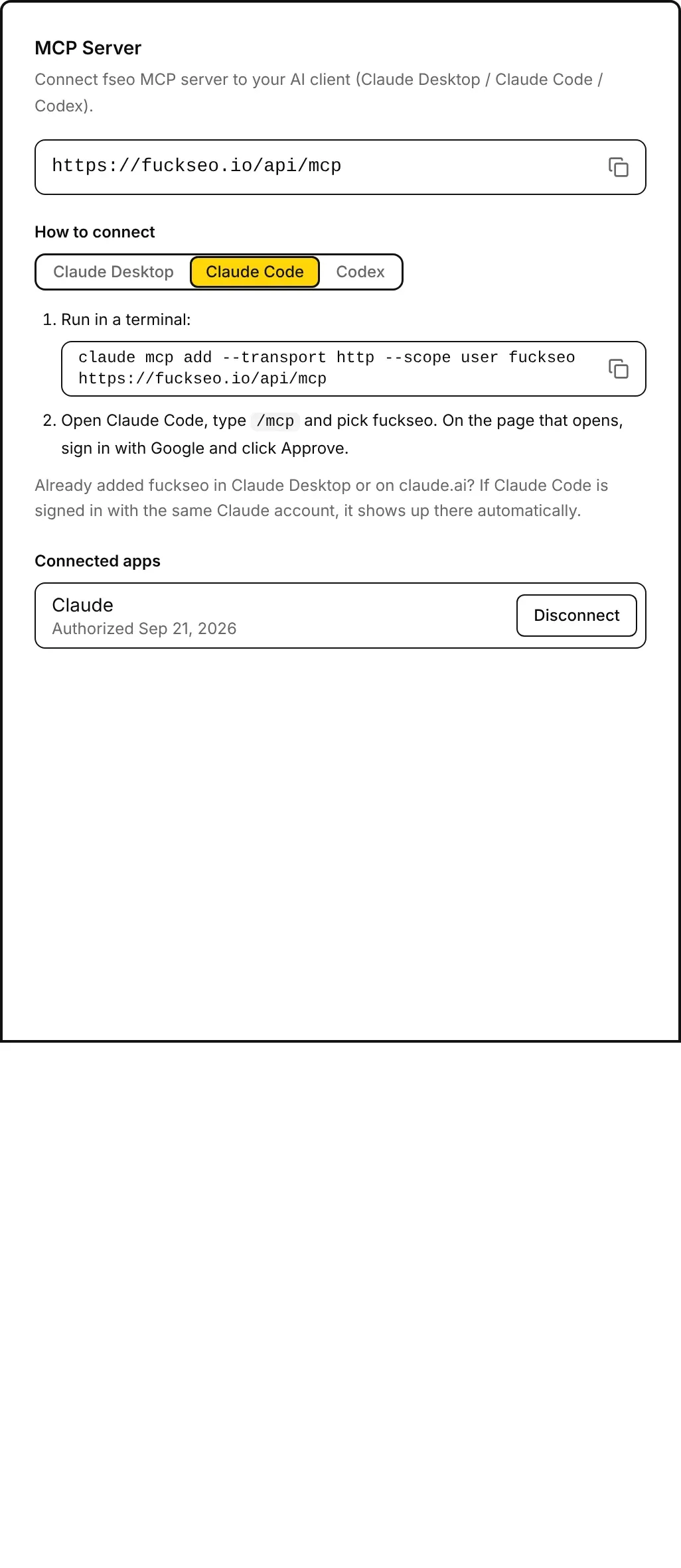
Fuck SEO runs an MCP (Model Context Protocol) server at https://fuckseo.io/api/mcp. Connect an AI client to it and you can ask about your Search Console data in a chat; the client fetches the numbers through Fuck SEO’s tools. The address, the setup steps and the apps you’ve connected are on the MCP Server card in Settings.
Supported clients
Fuck SEO supports Claude Desktop (a connector added there also works on claude.ai and in the Claude mobile app), Claude Code and Codex (the CLI, IDE extension and desktop app share one setup). Other MCP clients, such as Cursor or ChatGPT, are not supported and can’t complete the sign-in.
Connect a client
Under How to connect, pick your client to see its steps. Each command on the card has a copy button.
Claude Desktop
- Open Customize → Connectors, then click + Add → Add custom connector.
- Name it fuckseo, paste the server address
https://fuckseo.io/api/mcp, click Continue, then Add. If you see an OAuth client option, choose Register automatically. - Click Connect, sign in to fuckseo with Google and click Approve. In a chat, turn it on under + → Connectors.
Free plans can add one custom connector; on Team and Enterprise plans an admin adds it.
Claude Code
- Run in a terminal:
claude mcp add --transport http --scope user fuckseo https://fuckseo.io/api/mcp - Open Claude Code, type
/mcpand pick fuckseo. On the page that opens, sign in with Google and click Approve.
If you already added fuckseo in Claude Desktop or on claude.ai and Claude Code is signed in with the same Claude account, it shows up there automatically.
Codex
- Run in a terminal:
codex mcp add fuckseo --url https://fuckseo.io/api/mcp. It usually opens a page where you sign in to fuckseo with Google and click Approve. - If no page opened, run
codex mcp login fuckseo. - In Codex, type
/mcpto check that fuckseo is connected.
The approval page
Connecting opens a Fuck SEO page, Authorize access to your account, with the client’s name and Deny / Approve buttons (you sign in with Google first if needed). Signed in as at the bottom shows the Google account whose Search Console properties the client will read; with several accounts, switch to the right one before you approve.
Access lasts while you use it: an access token is valid for 30 days, the 30 days restart each time the client uses it, and the client can get a new one without asking you again.
What you can ask
The client chooses the tools from your question. Most tools take a property, a number of days and a search type (web by default, or image, video, news or Discover), and “previous period” means the same number of days right before. Discover has no query or position data, so tools built on queries return an error for it.
| Tool | What it returns |
|---|---|
list_sites | Your Search Console properties and their exact names |
get_dashboard | Totals against the previous period, top queries and pages, the top 20 countries and devices (28 days by default, up to 90) |
get_site_sparkline | Daily clicks and impressions with the previous period (91 days by default, up to 480) |
get_query_changes | Queries grouped into gained, lost, rising, falling and stable by clicks |
get_query_detail | The pages ranking for one query, and its daily position |
get_page_detail | The queries behind one page, and its daily clicks and impressions |
get_decay_map | Pages with fewer clicks in the last complete month than at the start of the window (6 months by default), month by month; sitemap pages only by default |
get_new_pages | Pages that got their first impression in the last N days (90 by default) |
get_rank_tracking | Positions of the keywords you track in Rank Tracking, with the ranking page |
get_striking_distance | Queries with an average position of 3-20 (by default), by impressions |
get_cannibalization | Queries where two or more of your pages get impressions |
get_international_seo | Clicks and impressions by language version, and the top countries |
get_segment_trends | Totals for each of your saved presets |
get_query_counting | How many distinct queries (or pages) ranked in 1-3, 4-10, 11-20 and 21+ |
get_core_update_impact | Pages that gained or lost clicks in the 14 days after a date range against the 14 days before it, such as a Google update |
get_notes | Your notes and notes shared with the site, with before-and-after numbers for the 50 most recent |
inspect_urls | A live URL Inspection of 1-10 URLs: index status, last crawl and canonical URLs |
The server also offers four prompt templates: Site performance summary, Compare two date ranges, Before and after a note and Segment trends. Each tells the AI which tools to call and asks it to report the numbers with their dates and definitions, without advice or guesses about causes. Clients that support MCP prompts list them, for example as slash commands in Claude Code.
Connected apps
Connected apps lists every client you approved, with the date you first authorized it. Disconnect removes one after you confirm: it loses access immediately, and to use it again you connect it from the client and approve once more. With nothing connected, the list says No AI clients connected yet.
Your data
- Data is read live from Google Search Console with the Google authorization you gave Fuck SEO when you signed in. If a tool says the server has no Google authorization for your account, sign in at fuckseo.io again.
- The tools only read: they can’t change anything in Search Console or edit your notes, keywords or presets. They answer only for properties your Google account can access;
list_sitesalso picks up properties you added recently. - Date ranges end on the latest day with final data, as in the web app (see Data and limits). The server keeps a result until the end of the day (China Standard Time) and asks Google again once a new day of data is out.
inspect_urlsis never cached, and each URL it checks counts toward Google’s daily URL Inspection limit for the site. - Fuck SEO records which tools you call each day and how many times, with no Search Console data. Using a connected client counts as using Fuck SEO, so your account isn’t deleted for inactivity. See the Privacy Policy.
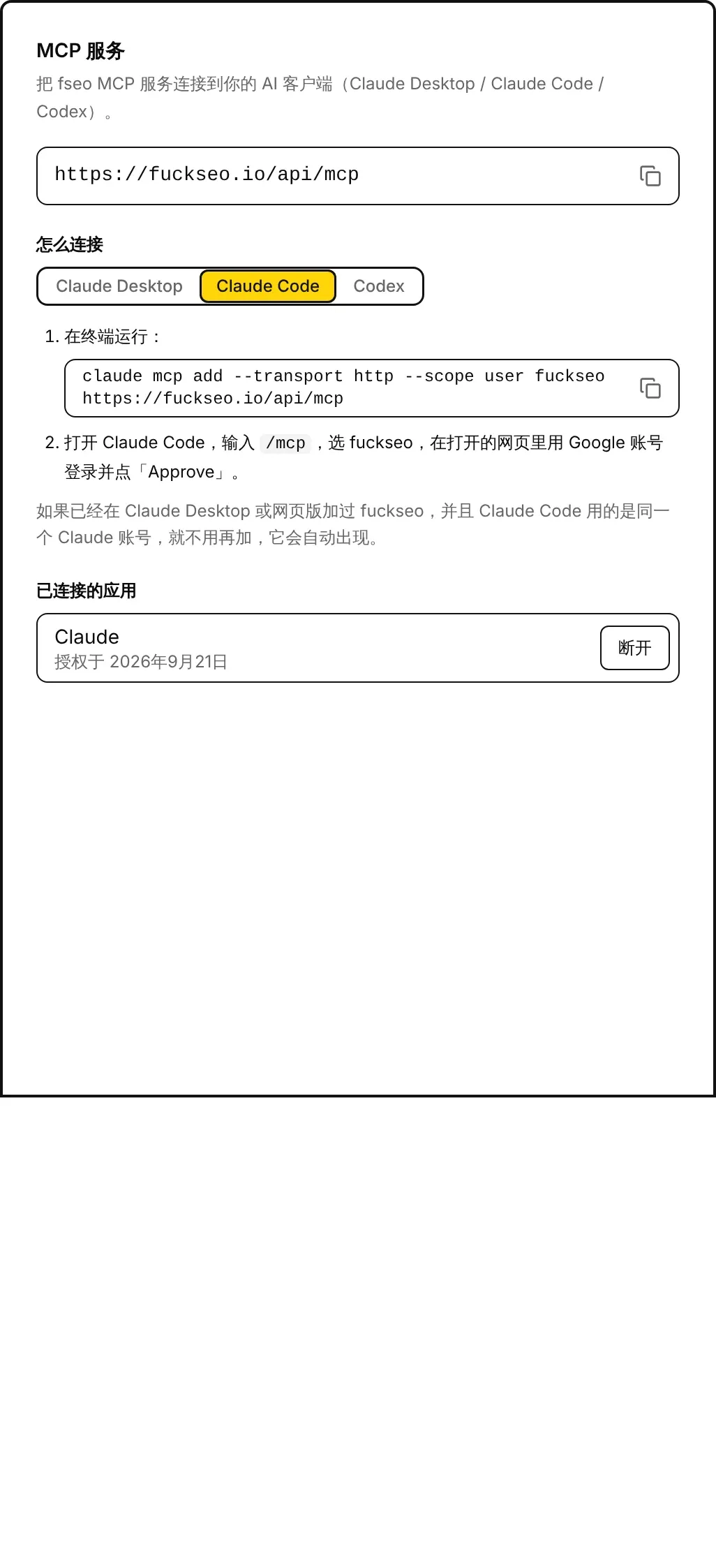
Fuck SEO 提供一个 MCP(Model Context Protocol)服务,地址是 https://fuckseo.io/api/mcp。把 AI 客户端连上以后,就可以在对话里询问你的 Search Console 数据,客户端会通过 Fuck SEO 的工具去取数字。服务地址、各客户端的连接步骤和已经连接的应用,都在 系统设置 的 MCP 服务 卡片里。
支持的客户端
Fuck SEO 支持 Claude Desktop(在 Claude Desktop 加的连接器,在网页版和手机上也能用)、Claude Code 和 Codex(命令行、编辑器插件和桌面版共用一份设置)。Cursor、ChatGPT 等其他 MCP 客户端不在支持范围内,无法完成登录授权。
连接客户端
在 怎么连接 下面选你用的客户端,就会显示对应的步骤。卡片上的每条命令都有复制按钮。
Claude Desktop
- 打开 Customize(自定义)→ Connectors(连接器),点「+ Add」→「Add custom connector」。
- 名称填 fuckseo,网址填服务地址
https://fuckseo.io/api/mcp,点 Continue,再点 Add。如果看到「OAuth client」选项,选「Register automatically」。 - 点 Connect,用 Google 账号登录 fuckseo 并点「Approve」。聊天时在「+」→ Connectors 里打开它。
免费版只能加 1 个自定义连接器;Team 和 Enterprise 由管理员添加。
Claude Code
- 在终端运行:
claude mcp add --transport http --scope user fuckseo https://fuckseo.io/api/mcp - 打开 Claude Code,输入
/mcp,选 fuckseo,在打开的网页里用 Google 账号登录并点「Approve」。
如果已经在 Claude Desktop 或网页版加过 fuckseo,并且 Claude Code 用的是同一个 Claude 账号,就不用再加,它会自动出现。
Codex
- 在终端运行:
codex mcp add fuckseo --url https://fuckseo.io/api/mcp。一般会自动打开网页,在网页里用 Google 账号登录 fuckseo 并点「Approve」。 - 没有打开网页的话,运行
codex mcp login fuckseo。 - 在 Codex 里输入
/mcp,确认 fuckseo 已经连上。
授权页面
连接时会打开 Fuck SEO 的授权页面「Authorize access to your account」,上面写着客户端的名称,下面是「Deny」(拒绝)和「Approve」(同意)两个按钮;如果这个浏览器还没登录 Fuck SEO,会先让你用 Google 账号登录。页面底部「Signed in as」后面是客户端将使用的 Google 账号,它读取的就是这个账号的 Search Console 资源;有多个账号的话,先切换到要用的那个,再点「Approve」。
授权在使用期间一直有效:访问令牌有效期 30 天,客户端每用一次就重新计算 30 天,客户端也可以自行换取新令牌,不用你再次同意。
可以问什么
客户端会根据你的问题自己选择工具。大部分工具可以指定资源、天数和搜索类型(默认网页,也可以是图片、视频、新闻或 Discover),「上一周期」指紧挨着的前面同样天数。Discover 没有查询词和排名数据,基于查询词的工具在 Discover 下会返回错误。
| 工具 | 返回的内容 |
|---|---|
list_sites | 你的 Search Console 资源及其准确名称 |
get_dashboard | 与上一周期对比的汇总数字、热门查询词和页面、前 20 个国家和各设备(默认 28 天,最长 90 天) |
get_site_sparkline | 全站每日点击和展示,以及上一周期对应的日子(默认 91 天,最长 480 天) |
get_query_changes | 按点击把查询词分成新增、丢失、上升、下降、持平几类 |
get_query_detail | 某个查询词下有排名的页面,以及它每天的排名 |
get_page_detail | 某个页面获得展示的查询词,以及它每天的点击和展示 |
get_decay_map | 最近一个完整月的点击少于时间窗第一个月的页面(默认 6 个月),按月列出;默认只看 sitemap 里的页面 |
get_new_pages | 最近 N 天里第一次获得展示的页面(默认 90 天) |
get_rank_tracking | 你在 排名追踪 里追踪的关键词的排名,以及排名的页面 |
get_striking_distance | 平均排名在 3-20 名(默认)的查询词,按展示量排序 |
get_cannibalization | 有两个及以上页面获得展示的查询词 |
get_international_seo | 按语言版本统计的点击和展示,以及排名前列的国家 |
get_segment_trends | 你保存的每个预设的汇总数字 |
get_query_counting | 排名在 1-3、4-10、11-20 和 21+ 的不同查询词(或页面)各有多少个 |
get_core_update_impact | 一段日期(比如一次 Google 更新)之后 14 天对比之前 14 天,点击增加和减少的页面 |
get_notes | 你的笔记和这个网站上别人共享的笔记,最近 50 条带前后对比数字 |
inspect_urls | 实时检查 1-10 个网址:索引状态、上次抓取时间和规范网址 |
这个服务还提供四个提示词模板:Site performance summary(站点表现汇总)、Compare two date ranges(对比两段日期)、Before and after a note(笔记前后对比)和 Segment trends(分组趋势)。每个模板都告诉 AI 该调用哪些工具,并要求它只汇报数字以及对应的日期和口径,不给建议,也不猜测原因。支持 MCP 提示词的客户端会把它们列出来,比如 Claude Code 里的斜杠命令。
已连接的应用
已连接的应用 列出你同意过的所有客户端,以及第一次授权的日期。点 断开 并确认后,该客户端会立即失去访问权限;要继续使用,需要在客户端里重新连接并授权。还没有连接任何客户端时,这里显示 还没有连接的 AI 客户端。
你的数据
- 数据用你登录 Fuck SEO 时给的 Google 授权,实时从 Google Search Console 读取。如果工具回复服务器没有你账号的 Google 授权,到 fuckseo.io 重新登录一次即可。
- 工具只读取数据:不能修改 Search Console 里的任何东西,也不会改动你的笔记、追踪词或预设。只能查询你的 Google 账号在 Search Console 里有权限的资源;
list_sites也会把你最近新加的资源带进来。 - 日期范围和网页版一样,截止到有最终数据的最新一天(见 数据说明)。服务器会把结果保留到当天结束(北京时间),Google 出了新一天的数据后再重新读取。
inspect_urls从不缓存,每检查一个网址都会占用 Google 给这个站点的每日网址检查额度。 - Fuck SEO 会记录你每天调用了哪些工具、各调用了几次,不包含任何 Search Console 数据。使用已连接的客户端也算使用 Fuck SEO,所以账号不会因为不活跃被删除。详见 隐私政策。