Help Center帮助中心 Keywords关键词
Striking Distance排名机会
Last updated更新于 2026-10-09
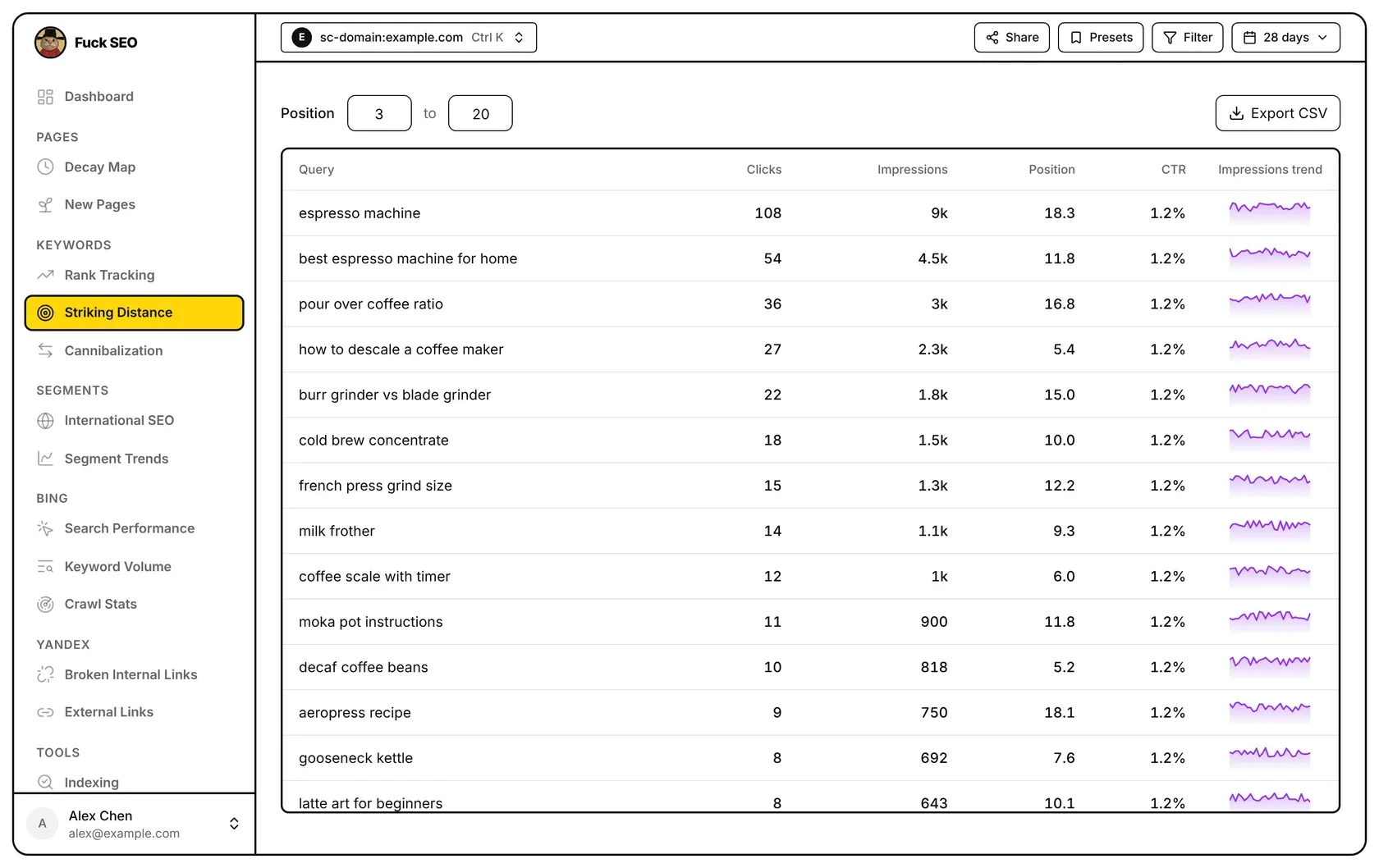
Striking Distance lists the queries whose average position in the selected period falls inside a position range you choose, 3 to 20 by default. Click a query to see its last 30 days of impressions and every page of yours that ranks for it.
How the numbers are calculated
The page reads every query and page combination for the date range in the top bar, then adds up each query across all the pages that rank for it:
- Clicks and Impressions are totals for the query.
- Position is the average of the pages’ positions, weighted by their impressions.
- CTR is clicks ÷ impressions.
Filters from Filter or Presets and the Search Type in the date menu apply. Discover has no query data, so this page works with Web, Image, Video and News only.
If the period has more than 100,000 query and page combinations, only the 100,000 with the most clicks are loaded and a note appears above the table; some queries may be missing and positions may be slightly off.
Position range
Next to Position, type the lowest and highest position and press Enter or click elsewhere. Both ends are included, the lowest allowed value is 1, and if the first number is larger than the second they are swapped. The range filters on the query’s average position as calculated above. It isn’t saved: it goes back to 3 to 20 when you leave the page.
The table
Queries are listed by impressions, highest first; the order can’t be changed. Rows load 50 at a time as you scroll. The columns are Query, Clicks, Impressions, Position, CTR and Impressions trend.
Impressions trend shows daily impressions for the last 30 days up to the end date, whatever the length of the selected range. It’s only loaded for the 50 queries with the most impressions in the period, counted across all positions before the range is applied, so the other rows have no trend line.
On phones each query takes two lines, the query and then the four numbers; the trend is in the side panel.
Query details
Click a row to open a side panel for the query:
- the query’s Clicks, Impressions, Position and CTR;
- Impressions, last 30 days: a daily chart; hover a day to see its impressions and clicks. Queries outside the top 50 by impressions show a note instead;
- Ranking pages: every page with impressions for the query, most impressions first, each with its own position, clicks, impressions and CTR. When more than one page ranks, each also shows its Impr. share, the part of the query’s impressions that page received.
Export
Export CSV downloads the queries in the current position range, one row per query and ranking page: Query, Clicks, Impressions, Position, CTR, then URL, URL Clicks, URL Impressions, URL Position and URL CTR for that page. The button isn’t shown on phones.
Related pages: Rank Tracking follows the keywords you pick, and Cannibalization lists queries that several of your pages rank for.
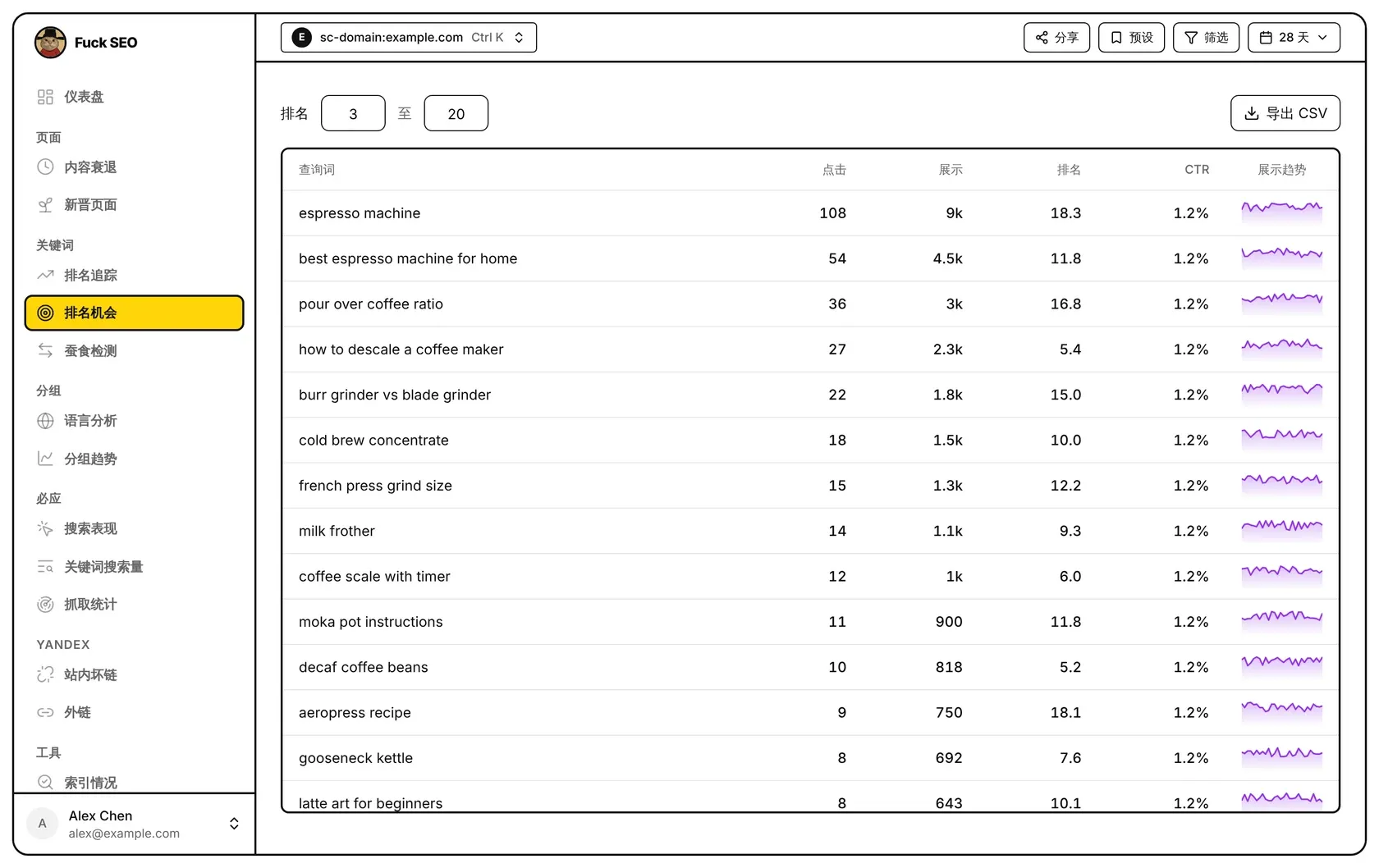
排名机会列出所选周期内平均排名落在你设定区间里的查询词,默认区间是 3 至 20。点开一个查询词,可以看到它近 30 天的展示,以及本站为它排名的所有页面。
数字怎么算
这个页面读取顶部日期范围内所有「查询词 × 页面」的组合,再把每个查询词在各个页面上的数据汇总:
- 点击、展示:这个查询词的合计。
- 排名:各页面排名按展示量加权的平均值。
- CTR:点击 ÷ 展示。
筛选、预设 里的条件和日期菜单里的 搜索类型 会生效。Discover 没有查询词数据,这个页面只适用于网页、图片、视频和新闻。
周期内「查询词 × 页面」的组合超过 10 万个时,只加载点击最多的前 10 万个,表格上方会出现提示:可能漏掉部分查询词,显示的排名也可能略有偏差。
排名区间
在 排名 后面的两个框里输入最小和最大排名,按 回车 或点别处生效。区间包含两端,最小可填 1;第一个数比第二个大时会自动对调。区间按上面算出的查询词平均排名筛选。区间不会保存,离开这个页面后恢复为 3 至 20。
表格
查询词按展示从高到低排列,顺序不能更改;往下滚动时每次多加载 50 行。各列是 查询词、点击、展示、排名、CTR 和 展示趋势。
展示趋势 显示截至结束日期的近 30 天每日展示,和所选日期范围的长短无关。只有周期内展示最多的 50 个查询词有这条线(按全部排名统计,不只是区间内的),其他行这一格为空。
手机上每个查询词占两行,上面是查询词,下面是四个数字;趋势在点开的面板里看。
查询词详情
点一行,右侧滑出这个查询词的面板:
- 这个查询词的 点击、展示、排名 和 CTR;
- 近 30 天展示:按天的图表,鼠标移到某一天可以看到当天的展示和点击。不在展示量前 50 的查询词这里只显示一行说明;
- 排名页面:为这个查询词获得展示的每个页面,按展示从多到少排列,各自显示排名、点击、展示和 CTR。有不止一个页面时,每个页面还会显示 展示份额,即它在这个查询词全部展示中的占比。
导出
导出 CSV 下载当前排名区间内的查询词,每个「查询词 × 排名页面」一行:查询词、点击、展示、排名、CTR,以及该页面的网址、点击、展示、排名和 CTR。手机上不显示这个按钮。