Help Center帮助中心 Tools工具
Export Data导出数据
Last updated更新于 2026-10-09
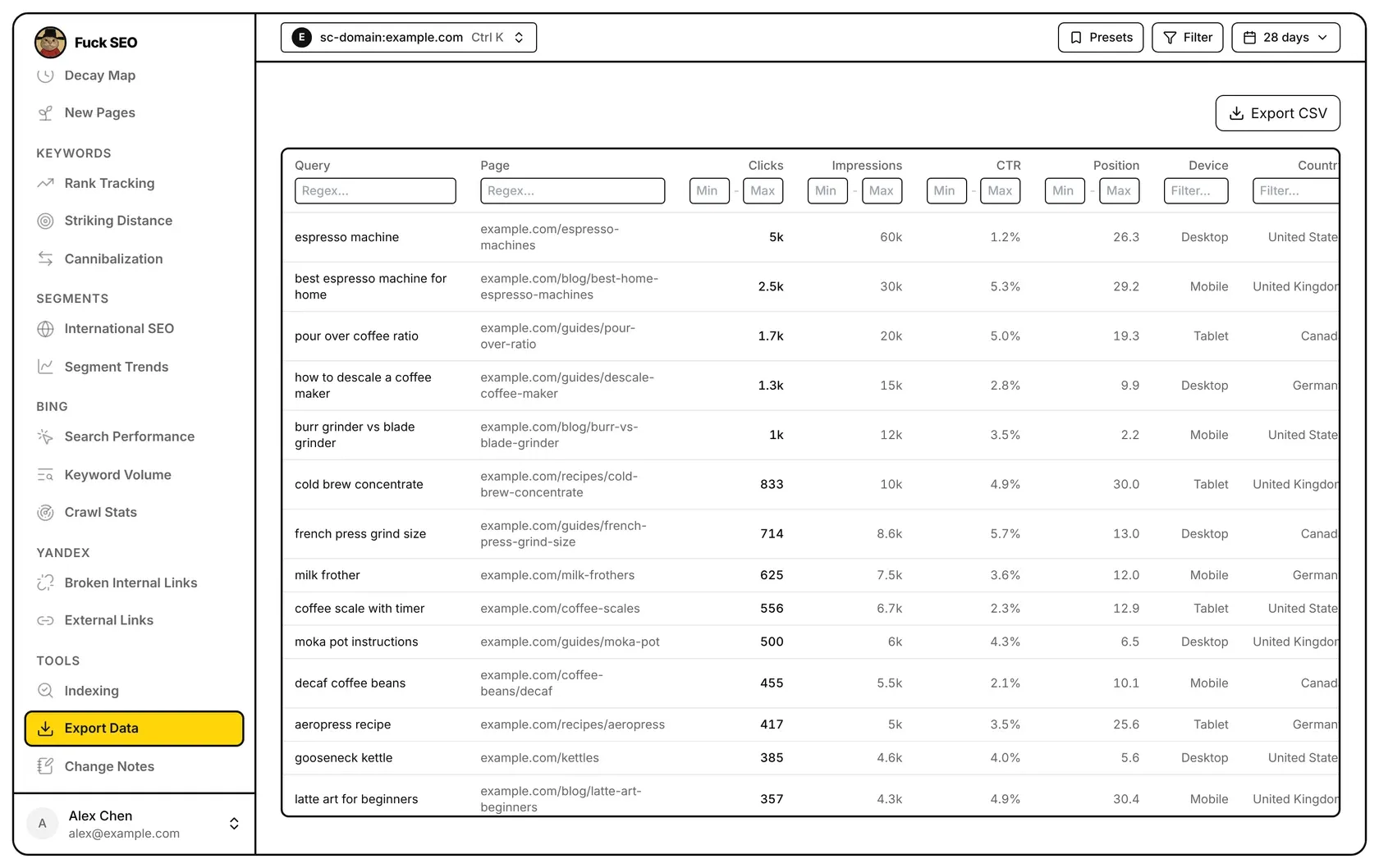
Export Data loads the raw Search Console rows for the selected date range, broken down by query, page, device and country at the same time. You can filter and sort the rows in the table, then download the ones that match as a CSV file.
What is loaded
- The page asks the Search Console API for the dimensions query, page, device and country in one request. Each row is one combination of the four, with its clicks, impressions, CTR and position.
- One request returns at most 25,000 rows, so on a large site only the first 25,000 rows Google returns are loaded.
- The date range comes from the date menu, up to 16 months. Without a custom range, it ends on the latest day with final data. The Comparison Period option isn’t used here.
- The Search Type in the date menu applies. Discover has no query, device or position data, so those columns are hidden and left out of the CSV.
- Filter and Presets in the toolbar don’t change this table. Use the filters in the column headers instead.
The Page column shows the path for a URL-prefix property, and the host plus the path for a Domain property, which can include several subdomains.
Filter the rows
Each column name has a filter under it. When you use several, a row must match all of them. The table updates shortly after you stop typing.
- Query and Page: a regular expression, not case-sensitive. If what you type isn’t a valid regular expression, the box is outlined in red and the text is matched as plain text instead. The page filter is matched against the full URL, including
https://and the host. - Clicks, Impressions, CTR and Position: a Min and a Max box; either can be left empty, and both limits are included. CTR is in percent, so type
2.5for 2.5%. - Device and Country: text that matches either the name shown in the table or Google’s code, for example “mobile” or “usa”.
Sort and scroll
Click a column name to sort by it, and click again to reverse the order. The table shows 100 rows at a time and loads more as you scroll.
Download
Export CSV downloads every row that matches your filters, in the current sort order, including rows you haven’t scrolled to. The file, gsc_export.csv, has the columns query, page, clicks, impressions, ctr, position, device and country:
- page is the full URL;
- ctr is a percentage (
1.2means 1.2%); - device and country are Google’s codes, such as
MOBILEorusa.
On phones
The Export CSV buttons on other pages are hidden on phones; on Export Data the button stays. On a phone the table scrolls sideways with the first column fixed.
For how the date range and totals are worked out, see Data and limits.
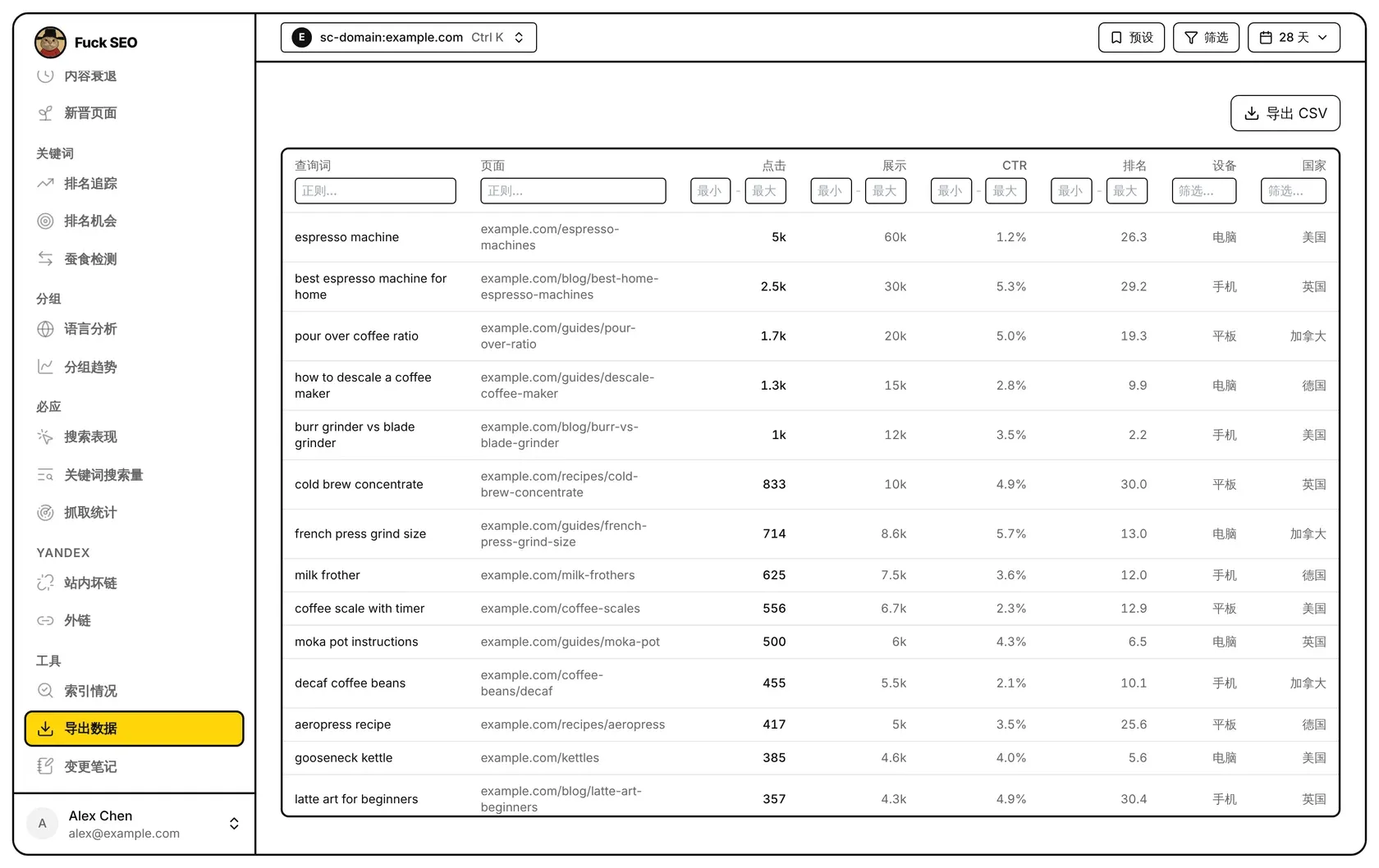
导出数据读取所选日期范围内 Search Console 的原始数据行,同时按查询词、页面、设备和国家细分。你可以在表格里筛选、排序,然后把符合条件的行下载成 CSV 文件。
读取哪些数据
- 页面向 Search Console API 发一次请求,维度是查询词、页面、设备和国家。每一行是这四项的一种组合,带有它的点击、展示、CTR 和排名。
- 一次请求最多返回 25,000 行,所以大站只会读到 Google 返回的前 25,000 行。
- 日期范围来自日期菜单,最长 16 个月。没有选自定义日期时,截止到已有最终数据的最新一天。这里不使用 对比周期。
- 日期菜单里的 搜索类型 生效。Discover 没有查询词、设备和排名数据,这几列会隐藏,也不会写进 CSV。
- 工具栏的 筛选 和 预设 不影响这张表,请用列名下面的筛选框。
页面 列在网址前缀资源下显示路径;网域资源可能包含多个子域名,所以显示主机名加路径。
筛选
每个列名下面都有筛选框。同时用几个时,一行要全部满足才会显示。停止输入片刻后表格才更新。
- 查询词 和 页面:正则表达式,不区分大小写。输入的内容不是有效的正则时,输入框会变成红框,改为按普通文字匹配。页面筛选匹配的是完整网址,包括
https://和主机名。 - 点击、展示、CTR 和 排名:最小 和 最大 两个框,可以只填一个,两端都包含在内。CTR 按百分数填,2.5% 就写
2.5。 - 设备 和 国家:输入的文字可以匹配表格里显示的名称,也可以匹配 Google 的代码,例如「手机」或「usa」。
排序和滚动
点列名按这一列排序,再点一次反过来。表格每次显示 100 行,往下滚动时继续加载。
下载
导出 CSV 下载符合筛选条件的所有行,按当前排序,没滚动到的行也包括在内。文件名是 gsc_export.csv,列为 query、page、clicks、impressions、ctr、position、device、country:
- page 是完整网址;
- ctr 是百分数(
1.2表示 1.2%); - device 和 country 是 Google 的代码,例如
MOBILE、usa。
在手机上
其他页面的 导出 CSV 按钮在手机上不显示,导出数据页面保留这个按钮。手机上表格可以左右滑动,第一列固定不动。
日期范围和汇总数字怎么算,见 数据说明。