Help Center帮助中心 Sharing, AI and data分享、AI 和数据
Sharing分享
Last updated更新于 2026-10-09
The Share button in the top bar gives you two ways to show a site’s data to people who don’t sign in: an Interactive link that opens a read-only Fuck SEO for that one site, and a Report, a fixed snapshot you send as a link or a PDF.
Share is on the Dashboard, Decay Map, New Pages, Rank Tracking, Striking Distance, Cannibalization, International SEO, Segment Trends and Indexing. On the Dashboard it becomes available once the data has loaded.
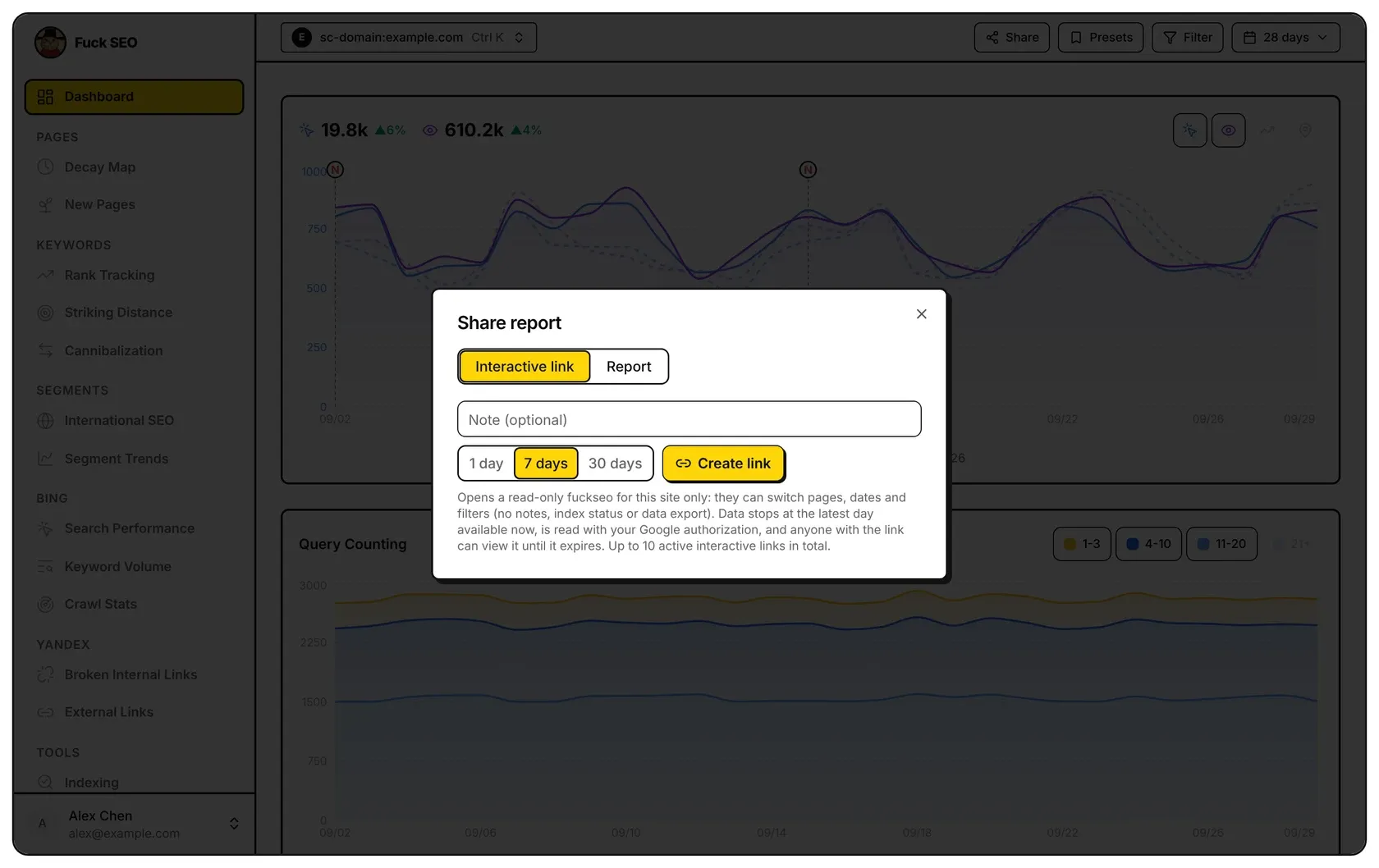
Interactive link
The person who opens the link sees Fuck SEO with only this site and can:
- switch between the Dashboard, Decay Map, New Pages, Rank Tracking (with your tracked keywords), Striking Distance, Cannibalization, International SEO and Segment Trends;
- change dates, comparison period, search type and filters, apply your presets, open detail panels and use the Dashboard’s Export CSV.
Indexing, Export Data, Change Notes and Settings aren’t available, notes don’t appear on the charts, and viewers can’t change anything: no tracking keywords, editing presets or adding notes.
Pages are read live from Google with your Google authorization. The data stops at the latest day available when you created the link, and later dates can’t be picked. The sidebar shows Shared view (read-only), the date the data runs to and when the link expires. If your Google authorization stops working, the link shows a message instead of data.
To create one:
- Optionally fill in Note (optional) (up to 50 characters) to label the link in your own lists; viewers don’t see it.
- Choose 1 day, 7 days or 30 days.
- Click Create link, then Copy. The link opens in the interface language you’re using.
You can have up to 10 active interactive links across all your sites. When you have 10, Create link first asks to revoke the oldest one: Revoke it and create.
Report
The Report tab builds a report from the current dates, comparison period, search type and filters of the Dashboard, all stated at the top of the report. Under Include, tick Totals, Daily chart, Top 10 queries, Top 10 pages, Top 10 countries, Devices and Notes in this period (all but countries and devices start ticked).
Under Other pages you can add Decay Map, New Pages, Rank Tracking, Striking Distance, Cannibalization, International SEO, Segment Trends and Indexing. A section’s data is loaded only when you tick it, and opening Share from one of these pages ticks its section and puts it first. The Indexing section uses the URLs checked today on the Indexing page and doesn’t inspect any itself. With the Discover search type, Top 10 queries, Rank Tracking, Striking Distance and Cannibalization aren’t offered.
Note (optional, shown at the top) adds a message for readers. On a wide screen the preview shows the report: drag a block onto another to move it, or click × to remove it.
Then choose how to send it:
- Snapshot link (fixed content): add an optional note, choose 1, 7 or 30 days and click Create link. The report is encrypted in your browser before it’s uploaded. The key is the part of the link after #, which browsers don’t send to servers, so our server only stores data it can’t read. Anyone with the full link can open the report until it expires, without signing in. Copy the link straight away: we don’t store the key, so the link can’t be copied again later. Changing the sections afterwards clears the link shown, and you create a new one.
- Save as PDF downloads the same report as an A4 PDF. A file can’t be taken back once sent.
Either way, the report is the data at the moment you made it and doesn’t update. You can have up to 50 active snapshot links, and each encrypted report can be up to 1 MB; a larger one asks you to untick some sections.
Manage and revoke links
The dialog lists the current site’s active links of each kind, with when each was created and expires. Settings has a Shared links card with the active links for all your sites: Interactive links (with Copy and Revoke) and Snapshot links (with Revoke).
To revoke a link, click Revoke, then Click again to revoke. It stops working at once and, like an expired link, shows This link has expired or been revoked.
顶栏的 分享 按钮提供两种方式,把站点数据给不需要登录的人看:互动链接 打开的是只有这一个站点的只读版 Fuck SEO;报告 是固定内容的快照,可以发链接,也可以保存为 PDF。
仪表盘、内容衰退、新晋页面、排名追踪、排名机会、蚕食检测、语言分析、分组趋势和索引情况都有 分享 按钮。在仪表盘上,要等数据加载完才能点。
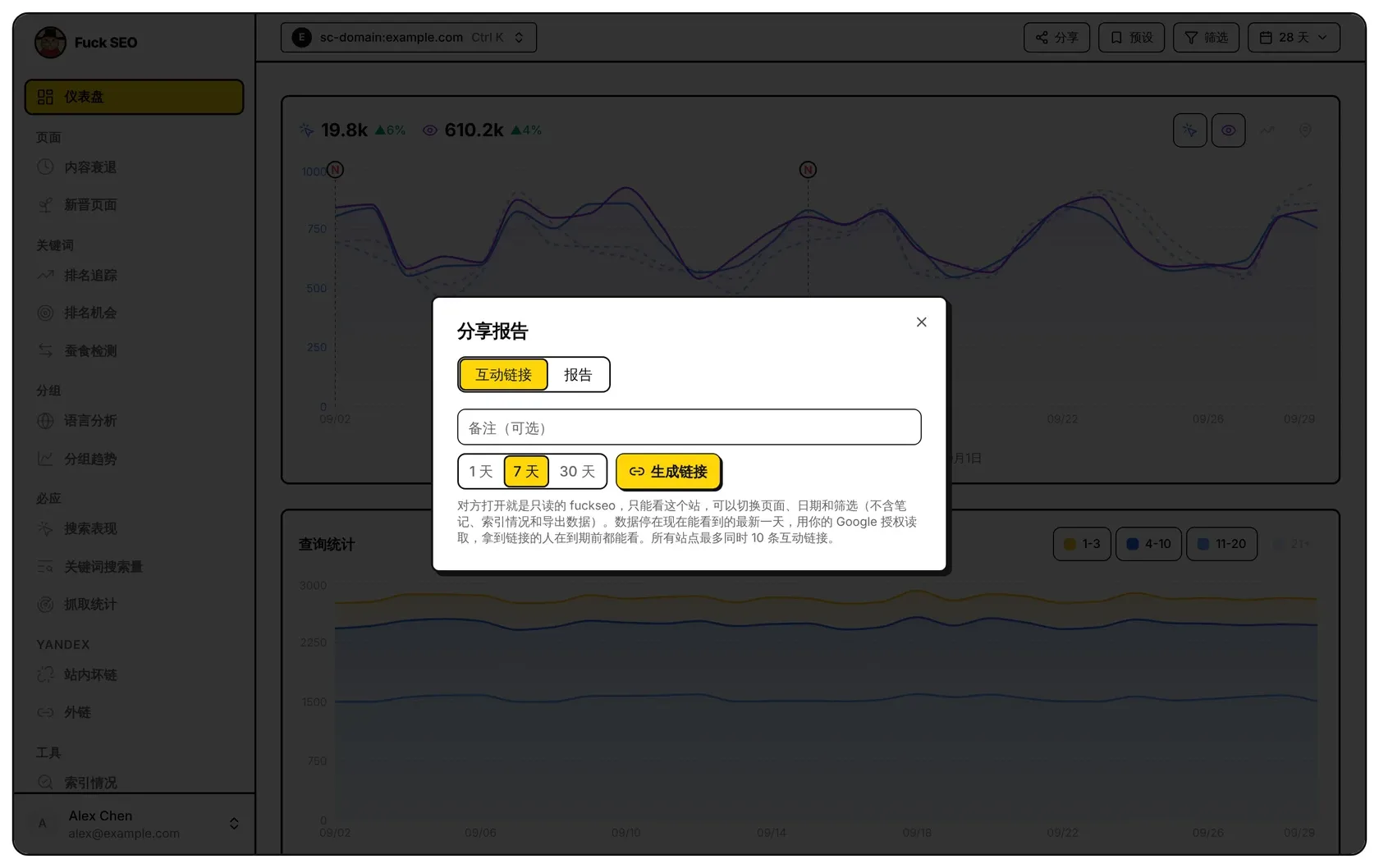
互动链接
对方打开链接后,看到的是只有这个站点的 Fuck SEO,可以:
- 在仪表盘、内容衰退、新晋页面、排名追踪(显示你的追踪词)、排名机会、蚕食检测、语言分析和分组趋势之间切换;
- 修改日期、对比周期、搜索类型和筛选,套用你的预设,打开详情面板,使用仪表盘的 导出 CSV。
索引情况、导出数据、变更笔记和系统设置都看不到,图表上也不显示笔记;对方不能做任何修改,不能加追踪词、改预设或记笔记。
每个页面都用你的 Google 授权实时向 Google 读取。数据停在生成链接时能看到的最新一天,之后的日期选不了。侧边栏会显示 只读的分享页面、数据截至哪天和链接有效期。如果你的 Google 授权失效,链接会显示提示,读不到数据。
生成步骤:
- 可以在 备注(可选) 里写几个字(最多 50 字),方便你在自己的列表里区分链接,对方看不到。
- 选择 1 天、7 天 或 30 天 有效期。
- 点 生成链接,再点 复制。链接会用你当前的界面语言打开。
所有站点加起来最多同时有 10 条有效的互动链接。已有 10 条时点 生成链接,会先请你确认撤销最早的一条:撤销并生成。
报告
报告 页按 仪表盘 当前的日期、对比周期、搜索类型和 筛选 生成报告,报告顶部会写明这些设置。在 包含内容 下勾选 指标总览、每日趋势图、查询词前 10、页面前 10、国家前 10、设备 和 周期内的笔记(默认除国家和设备外都勾上)。
在 其他页面 下还可以加上内容衰退、新晋页面、排名追踪、排名机会、蚕食检测、语言分析、分组趋势和索引情况。勾上某个板块时才读取它的数据;从这些页面打开 分享 时,会自动勾上这一页的板块并排在最前面。索引情况板块用的是今天在索引情况页查过的 URL,报告不会另外检查。搜索类型是 Discover 时,不提供查询词前 10、排名追踪、排名机会和蚕食检测。
说明(可选,显示在报告顶部) 可以写给看报告的人。屏幕够宽时右侧有报告预览:把一个板块拖到另一个板块上可以调整顺序,点 × 可以移除。
然后选择发送方式:
- 快照链接(固定内容):填写可选的备注,选择 1、7 或 30 天,点 生成链接。报告先在你的浏览器里加密再上传,解密钥匙是链接 # 后面的部分,浏览器不会把它发给服务器,所以我们的服务器只保存读不出内容的密文。拿到完整链接的人在到期前不用登录就能打开。生成后请马上复制:钥匙我们不保存,之后无法再次复制这条链接。生成后再改动勾选的板块,显示的链接会清空,需要重新生成。
- 保存为 PDF:把同一份报告下载为 A4 大小的 PDF。文件发出去后无法收回。
无论哪种方式,报告都是生成那一刻的数据,不会自动更新。每人最多同时有 50 条有效的快照链接,每份加密后的报告不超过 1 MB;超过时会提示你少选几个板块。
管理和撤销链接
分享窗口里列出当前站点每种链接的有效链接,以及生成和到期时间。系统设置 里的 已分享的链接 卡片列出你所有站点的有效链接:互动链接(可 复制、撤销)和 快照链接(可 撤销)。
要撤销一条链接,点 撤销,再点 再点一次撤销。撤销后链接立即失效,和过期的链接一样显示 链接已过期或已被撤销。