Help Center帮助中心 Tools工具
Indexing索引情况
Last updated更新于 2026-10-09
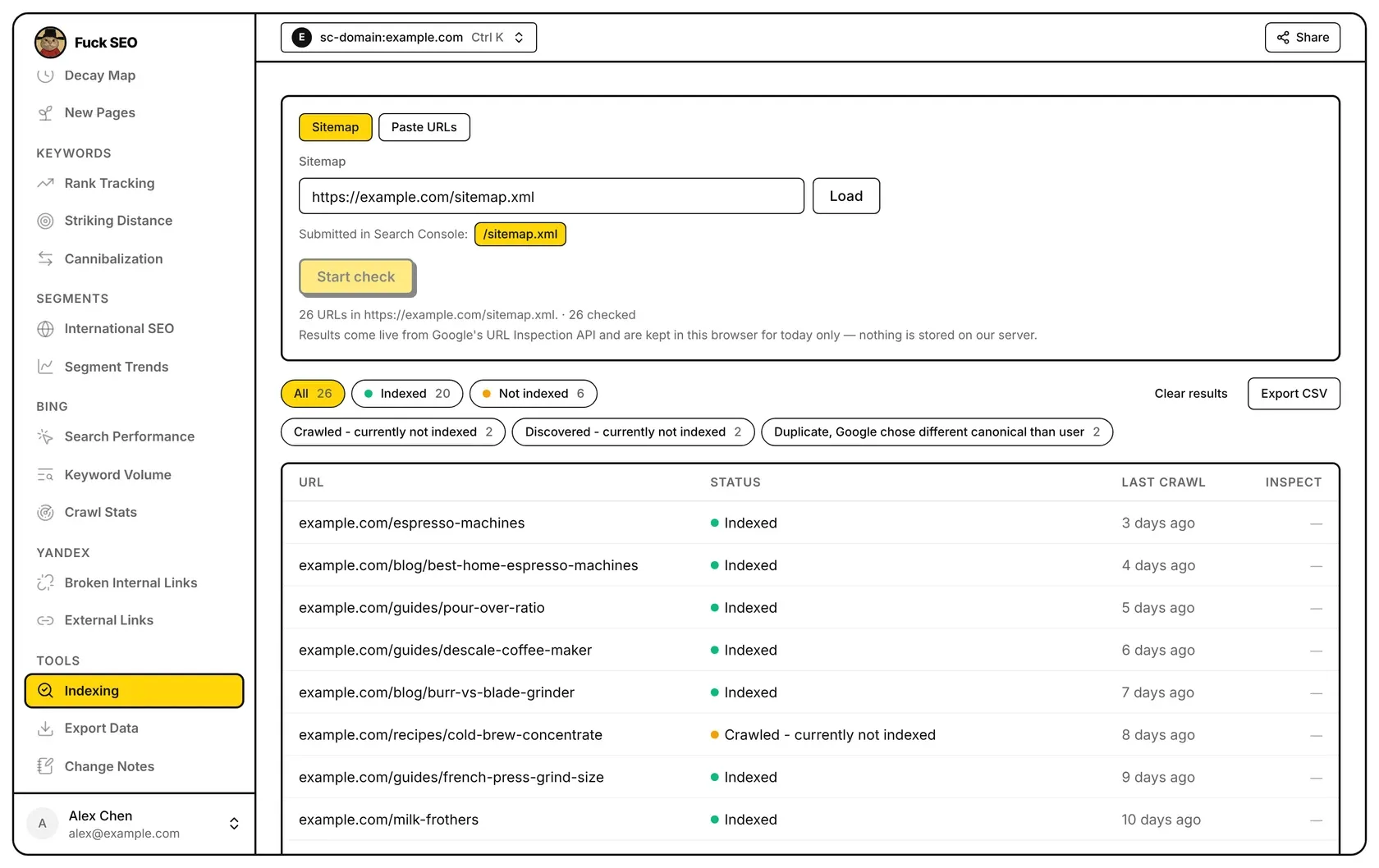
Indexing asks Google’s URL Inspection API about each URL you give it and shows whether the URL is indexed, Google’s reason when it isn’t, and when Google last crawled it. Opening the page doesn’t check anything: you choose the URLs, then click Start check.
Choose the URLs
Pick a source with the buttons at the top.
Sitemap: type a sitemap URL and click Load. Under the box, Submitted in Search Console: lists the sitemaps submitted for this property in Search Console; click one to load it. A few rules:
- The sitemap must be on this property: the same host (and port) for a URL-prefix property, or the domain or one of its subdomains for a Domain property. Otherwise the page says “The sitemap must be on …” and Load stays disabled.
- A
Sitemap:prefix copied from robots.txt is removed for you. - A sitemap index is expanded into its child sitemaps (up to 50 of them). Duplicate URLs are removed.
- Up to 2,000 URLs are loaded. If the sitemap has more, the page says that only the first 2,000 were loaded.
- If the sitemap can’t be read, for example because the site’s firewall blocked the request, the reason is shown under the box.
Paste URLs: paste up to 2,000 URLs, one per line (spaces and commas also separate them). URLs that aren’t on this property are ignored and counted, duplicates are removed, and beyond 2,000 only the first 2,000 are used.
You can also start from a page’s detail panel: Check indexing adds that page to the Paste URLs list and opens this page. Nothing is inspected until you click Start check.
Run the check
Start check inspects every URL in the list that hasn’t been checked today, 20 at a time, with a progress bar. Stop lets the batch already sent finish and then stops. Leaving the page also stops the check.
Google allows 2,000 URL inspections per site per day. When that quota is used up, the check stops and a message says so; the quota resets daily.
What is kept
Results come live from Google and are kept in this browser for today only; nothing is stored on our server. Results are pooled per site by URL, so if you load the same sitemap or list again today, URLs already checked are skipped and don’t use quota again. URLs whose inspection failed are tried again on the next run.
Clear results deletes all of today’s results for this site, not only the current list, after you confirm. Checking those URLs again uses quota again.
Read the results
The buttons above the table count the results and filter the table:
- All, Indexed and Not indexed, plus Errors when an inspection request failed.
- A second row with one button per reason a URL isn’t indexed, using Google’s coverage state (for example Crawled - currently not indexed), sorted by count. Selecting a reason shows Google’s definition of it under the buttons.
Click a button again to go back to all results. The table has four columns:
- URL.
- STATUS: Indexed, the reason it isn’t indexed, or Inspection failed. Hover a reason to see its definition. When Google chose a different canonical URL, the Google-selected canonical is shown underneath, and the user-declared canonical too if it differs.
- LAST CRAWL: how long ago Google last crawled the URL; hover for the date.
- INSPECT: Open GSC opens this URL’s inspection result in Search Console.
The table shows 50 rows at a time and loads more as you scroll.
Export CSV downloads every row that matches the selected filter, with the URL, status, coverage state, verdict, last crawl, crawl state, indexing state, Google and user canonicals, rich results and the inspection link. The button isn’t shown on phones.
Share in the toolbar can add today’s results from this browser to a share report; creating the report doesn’t inspect any URLs. See Sharing.
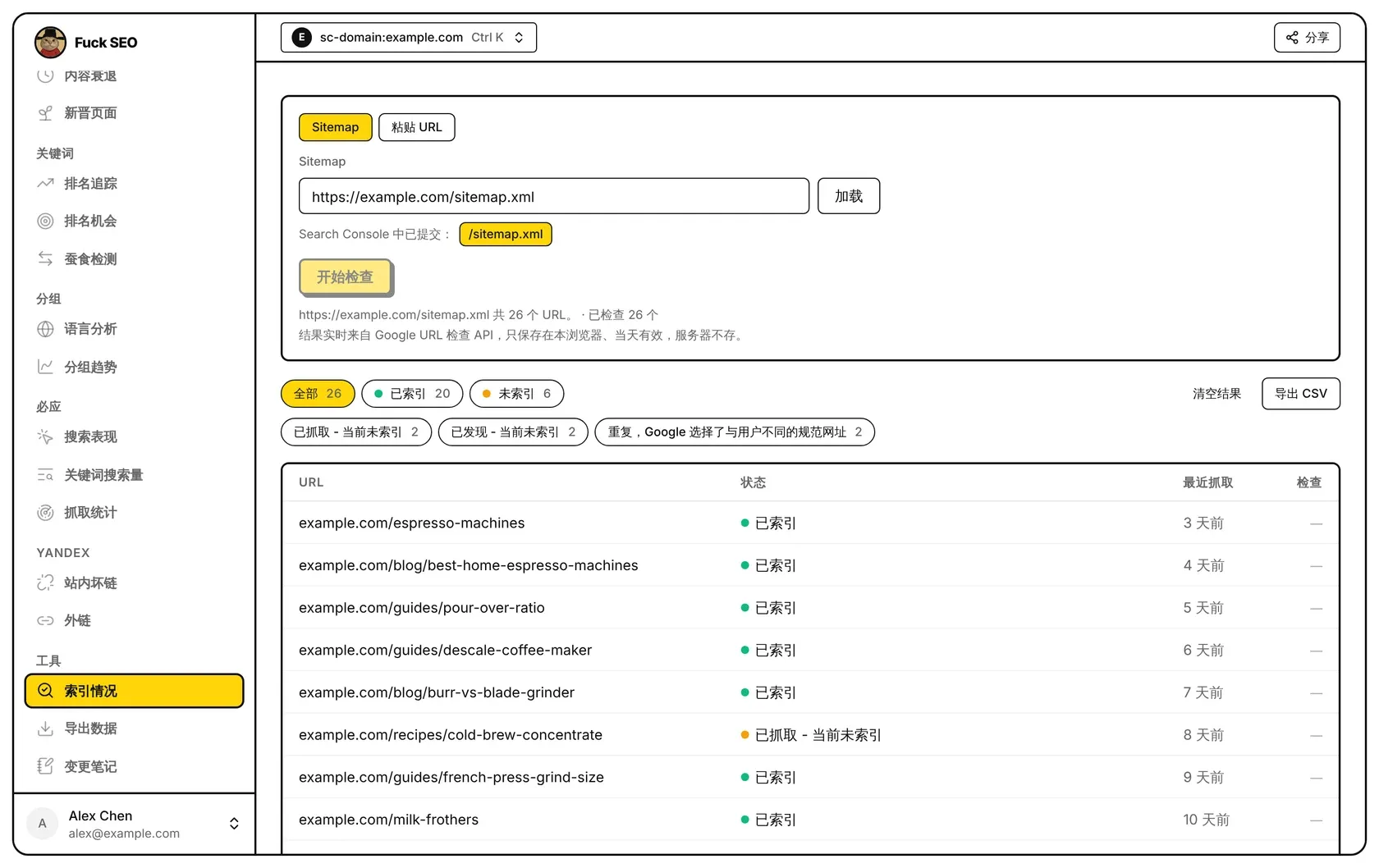
索引情况把你给出的每个网址交给 Google URL 检查 API,显示它是否已被编入索引、没有编入时 Google 给出的原因,以及 Google 最近一次抓取的时间。打开页面不会检查任何网址:先选好网址,再点 开始检查。
选择网址
用页面上方的按钮选择来源。
Sitemap:输入 sitemap 地址,点 加载。输入框下方的 Search Console 中已提交: 列出这个资源在 Search Console 里提交过的 sitemap,点一个即可加载。几条规则:
- sitemap 必须在这个资源下:网址前缀资源要求主机名(和端口)相同,网域资源可以是这个域名或它的子域名。否则页面提示「Sitemap 必须在 … 下。」,加载 按钮不可用。
- 从 robots.txt 复制来的
Sitemap:前缀会自动去掉。 - sitemap 索引文件会展开到它的子 sitemap(最多 50 个),重复的网址会去掉。
- 最多加载 2,000 个网址。sitemap 里更多时,页面会说明只加载了前 2,000 个。
- 读不了 sitemap 时(例如被网站的防火墙拦截),原因会显示在输入框下方。
粘贴 URL:粘贴最多 2,000 个网址,每行一个(空格和逗号也能分隔)。不在这个资源下的网址会被忽略并计数,重复的会去掉,超过 2,000 个时只取前 2,000 个。
也可以从页面的详情面板开始:检查收录 会把这个页面加到 粘贴 URL 列表里并打开本页。点 开始检查 之前不会检查任何网址。
开始检查
开始检查 会检查列表里今天还没查过的所有网址,每次 20 个,并显示进度条。停止 会等已发出的这一批查完再停下。离开这个页面也会停止检查。
Google 每个站点每天允许检查 2,000 个网址。额度用完时检查会停止,页面上会有提示;额度每天重置。
保存了什么
结果实时来自 Google,只保存在本浏览器、当天有效,我们的服务器不保存。结果按站点、按网址汇总:今天再次加载同一个 sitemap 或列表时,已经查过的网址会跳过,不再消耗额度。检查失败的网址会在下一次运行时重新检查。
清空结果 会在你确认后删除这个站点今天的全部结果,不只是当前列表。之后再检查这些网址会重新消耗额度。
查看结果
表格上方的按钮显示各类结果的数量,点一下即可筛选表格:
- 全部、已索引、未索引;有检查请求失败时还有 错误。
- 第二行按未编入索引的原因各一个按钮,用的是 Google 的索引状态(例如 已抓取 - 当前未索引),按数量排列。选中某个原因时,按钮下方会显示 Google 对它的定义。
再点一次同一个按钮,回到全部结果。表格有四列:
- URL。
- 状态:已索引、未编入索引的原因,或 检查失败。鼠标移到原因上可以看到它的定义。Google 选了另一个网址作为规范网址时,下方会显示 Google 选择的规范网址;用户声明的规范网址与它不同时也会显示。
- 最近抓取:Google 最近一次抓取距今多久,鼠标移上去可以看到具体日期。
- 检查:打开 GSC 会在 Search Console 中打开这个网址的检查结果。
表格每次显示 50 行,往下滚动时继续加载。
导出 CSV 下载符合当前筛选的所有行,包括网址、状态、索引状态、检查结论、最近抓取、抓取状态、编入索引状态、Google 和用户的规范网址、富媒体结果和检查链接。手机上不显示这个按钮。
工具栏的 分享 可以把本浏览器里今天的结果加进分享报告;生成报告不会检查任何网址。见 分享。